# AutoRAG
**Repository Path**: yyweb/AutoRAG
## Basic Information
- **Project Name**: AutoRAG
- **Description**: No description available
- **Primary Language**: Unknown
- **License**: Apache-2.0
- **Default Branch**: main
- **Homepage**: None
- **GVP Project**: No
## Statistics
- **Stars**: 0
- **Forks**: 1
- **Created**: 2025-03-07
- **Last Updated**: 2025-03-07
## Categories & Tags
**Categories**: Uncategorized
**Tags**: RAG, llm
## README
# AutoRAG
RAG AutoML tool for automatically finding an optimal RAG pipeline for your data.

 
[](https://www.linkedin.com/company/104375108/admin/dashboard/)

[](https://huggingface.co/AutoRAG)
[](https://github.com/orgs/Auto-RAG/projects/1/views/2)
There are many RAG pipelines and modules out there,
but you don’t know what pipeline is great for “your own data” and "your own use-case."
Making and evaluating all RAG modules is very time-consuming and hard to do.
But without it, you will never know which RAG pipeline is the best for your own use-case.
AutoRAG is a tool for finding the optimal RAG pipeline for “your data.”
You can evaluate various RAG modules automatically with your own evaluation data
and find the best RAG pipeline for your own use-case.
AutoRAG supports a simple way to evaluate many RAG module combinations.
Try now and find the best RAG pipeline for your own use-case.
Explore our 📖 [Document](https://docs.auto-rag.com)!!
Plus, join our 📞 [Discord](https://discord.gg/P4DYXfmSAs) Community.
---
Do you have any difficulties in optimizing your RAG pipeline?
Or is it hard to set up things to use AutoRAG?
Try [**AutoRAG Cloud**](https://tally.so/r/n0jOrZ) beta.
We will help you to run AutoRAG and optimize.
Plus, we can help you to build RAG evaluation dataset.
Starts with 9.99$ per optimization.
---
## YouTube Tutorial
https://github.com/Marker-Inc-Korea/AutoRAG/assets/96727832/c0d23896-40c0-479f-a17b-aa2ec3183a26
_Muted by default, enable sound for voice-over_
You can see on [YouTube](https://youtu.be/2ojK8xjyXAU?feature=shared)
## Use AutoRAG in HuggingFace Space 🚀
- [💬 Naive RAG Chatbot](https://huggingface.co/spaces/AutoRAG/Naive-RAG-chatbot)
- [✏️ AutoRAG Data Creation](https://huggingface.co/spaces/AutoRAG/AutoRAG-data-creation)
- [🚀 AutoRAG RAG Pipeline Optimization](https://huggingface.co/spaces/AutoRAG/AutoRAG-optimization)
## Colab Tutorial
- [Step 1: Basic of AutoRAG | Optimizing your RAG pipeline](https://colab.research.google.com/drive/19OEQXO_pHN6gnn2WdfPd4hjnS-4GurVd?usp=sharing)
- [Step 2: Data Creation | Create your own Data for RAG Optimization](https://colab.research.google.com/drive/1BOdzMndYgMY_iqhwKcCCS7ezHbZ4Oz5X?usp=sharing)
- [Step 3: Use Custom LLM & Embedding Model | Use Custom Model](https://colab.research.google.com/drive/12VpWcSTSOsLSyW0BKb-kPoEzK22ACxvS?usp=sharing)
# Index
- [Quick Install](#quick-install)
- [🐳 AutoRAG Docker Guide](#-autorag-docker-guide)
- [Data Creation](#data-creation)
- [Parsing](#1-parsing)
- [Chunking](#2-chunking)
- [QA Creation](#3-qa-creation)
- [RAG Optimization](#rag-optimization)
- [Set YAML File](#1-set-yaml-file)
- [Run AutoRAG](#2-run-autorag)
- [Run Dashboard](#3-run-dashboard)
- [Deploy your optimal RAG pipeline (for testing)](#4-deploy-your-optimal-rag-pipeline-for-testing)
- [Supporting Data Creation Modules](#-supporting-data-creation-modules)
- [Supporting RAG Optimization Nodes & modules](#supporting-rag-optimization-nodes--modules)
- [Supporting Evaluation Metrics](#supporting-evaluation-metrics)
- [FaQ](#-faq)
# Quick Install
We recommend using Python version 3.10 or higher for AutoRAG.
```bash
pip install AutoRAG
```
If you want to use the local models, you need to install gpu version.
```bash
pip install "AutoRAG[gpu]"
```
Or for parsing, you can use the parsing version.
```bash
pip install "AutoRAG[gpu,parse]"
```
# Data Creation
 
RAG Optimization requires two types of data: QA dataset and Corpus dataset.
1. **QA** dataset file (qa.parquet)
2. **Corpus** dataset file (corpus.parquet)
**QA** dataset is important for accurate and reliable evaluation and optimization.
**Corpus** dataset is critical to the performance of RAGs.
This is because RAG uses the corpus to retrieve documents and generate answers using it.
## Quick Start
### 1. Parsing
#### Set YAML File
```yaml
modules:
- module_type: langchain_parse
parse_method: pdfminer
```
You can also use multiple Parse modules at once.
However, in this case, you'll need to return a new process for each parsed result.
#### Start Parsing
You can parse your raw documents with just a few lines of code.
```python
from autorag.parser import Parser
parser = Parser(data_path_glob="your/data/path/*")
parser.start_parsing("your/path/to/parse_config.yaml")
```
### 2. Chunking
#### Set YAML File
```yaml
modules:
- module_type: llama_index_chunk
chunk_method: Token
chunk_size: 1024
chunk_overlap: 24
add_file_name: en
```
You can also use multiple Chunk modules at once.
In this case, you need to use one corpus to create QA and then map the rest of the corpus to QA Data.
If the chunk method is different, the retrieval_gt will be different, so we need to remap it to the QA dataset.
#### Start Chunking
You can chunk your parsed results with just a few lines of code.
```python
from autorag.chunker import Chunker
chunker = Chunker.from_parquet(parsed_data_path="your/parsed/data/path")
chunker.start_chunking("your/path/to/chunk_config.yaml")
```
### 3. QA Creation
You can create QA dataset with just a few lines of code.
```python
import pandas as pd
from llama_index.llms.openai import OpenAI
from autorag.data.qa.filter.dontknow import dontknow_filter_rule_based
from autorag.data.qa.generation_gt.llama_index_gen_gt import (
make_basic_gen_gt,
make_concise_gen_gt,
)
from autorag.data.qa.schema import Raw, Corpus
from autorag.data.qa.query.llama_gen_query import factoid_query_gen
from autorag.data.qa.sample import random_single_hop
llm = OpenAI()
raw_df = pd.read_parquet("your/path/to/parsed.parquet")
raw_instance = Raw(raw_df)
corpus_df = pd.read_parquet("your/path/to/corpus.parquet")
corpus_instance = Corpus(corpus_df, raw_instance)
initial_qa = (
corpus_instance.sample(random_single_hop, n=3)
.map(
lambda df: df.reset_index(drop=True),
)
.make_retrieval_gt_contents()
.batch_apply(
factoid_query_gen, # query generation
llm=llm,
)
.batch_apply(
make_basic_gen_gt, # answer generation (basic)
llm=llm,
)
.batch_apply(
make_concise_gen_gt, # answer generation (concise)
llm=llm,
)
.filter(
dontknow_filter_rule_based, # filter don't know
lang="en",
)
)
initial_qa.to_parquet('./qa.parquet', './corpus.parquet')
```
# RAG Optimization

### How AutoRAG optimizes RAG pipeline?

## 🐳 AutoRAG Docker Guide
This guide provides a quick overview of building and running the AutoRAG Docker container for production, with instructions on setting up the environment for evaluation using your configuration and data paths.
### 🚀 Building the Docker Image
Tip: If you want to build an image for a gpu version, you can use `autoraghq/autorag:gpu` or `autoraghq/autorag:gpu-parsing`
#### 1.Download dataset for [Tutorial Step 1](https://colab.research.google.com/drive/19OEQXO_pHN6gnn2WdfPd4hjnS-4GurVd?usp=sharing)
```bash
python sample_dataset/eli5/load_eli5_dataset.py --save_path projects/tutorial_1
```
#### 2. Run `evaluate`
> **Note**: This step may take a long time to complete and involves OpenAI API calls, which may cost approximately $0.30.
```bash
docker run --rm -it \
-v ~/.cache/huggingface:/root/.cache/huggingface \
-v $(pwd)/projects:/usr/src/app/projects \
-e OPENAI_API_KEY=${OPENAI_API_KEY} \
autoraghq/autorag:api evaluate \
--config /usr/src/app/projects/tutorial_1/config.yaml \
--qa_data_path /usr/src/app/projects/tutorial_1/qa_test.parquet \
--corpus_data_path /usr/src/app/projects/tutorial_1/corpus.parquet \
--project_dir /usr/src/app/projects/tutorial_1/
```
#### 3. Run validate
```bash
docker run --rm -it \
-v ~/.cache/huggingface:/root/.cache/huggingface \
-v $(pwd)/projects:/usr/src/app/projects \
-e OPENAI_API_KEY=${OPENAI_API_KEY} \
autoraghq/autorag:api validate \
--config /usr/src/app/projects/tutorial_1/config.yaml \
--qa_data_path /usr/src/app/projects/tutorial_1/qa_test.parquet \
--corpus_data_path /usr/src/app/projects/tutorial_1/corpus.parquet
```
#### 4. Run `dashboard`
```bash
docker run --rm -it \
-v ~/.cache/huggingface:/root/.cache/huggingface \
-v $(pwd)/projects:/usr/src/app/projects \
-e OPENAI_API_KEY=${OPENAI_API_KEY} \
-p 8502:8502 \
autoraghq/autorag:api dashboard \
--trial_dir /usr/src/app/projects/tutorial_1/0
```
#### 4. Run `run_web`
```bash
docker run --rm -it \
-v ~/.cache/huggingface:/root/.cache/huggingface \
-v $(pwd)/projects:/usr/src/app/projects \
-e OPENAI_API_KEY=${OPENAI_API_KEY} \
-p 8501:8501 \
autoraghq/autorag:api run_web --trial_path ./projects/tutorial_1/0
```
#### Key Points :
- **`-v ~/.cache/huggingface:/cache/huggingface`**: Mounts the host machine’s Hugging Face cache to `/cache/huggingface` in the container, enabling access to pre-downloaded models.
- **`-e OPENAI_API_KEY: ${OPENAI_API_KEY}`**: Passes the `OPENAI_API_KEY` from your host environment.
For more detailed instructions, refer to the [Docker Installation Guide](./docs/source/install.md#1-build-the-docker-image).
## Quick Start
### 1. Set YAML File
First, you need to set the config YAML file for your RAG optimization.
You can get various config YAML files at [here](./sample_config).
We highly recommend using pre-made config YAML files for starter.
If you want to make your own config YAML files, check out the [Config YAML file](#-create-your-own-config-yaml-file)
section.
Here is an example of the config YAML file to use `retrieval`, `prompt_maker`, and `generator` nodes.
```yaml
node_lines:
- node_line_name: retrieve_node_line # Set Node Line (Arbitrary Name)
nodes:
- node_type: retrieval # Set Retrieval Node
strategy:
metrics: [retrieval_f1, retrieval_recall, retrieval_ndcg, retrieval_mrr] # Set Retrieval Metrics
top_k: 3
modules:
- module_type: vectordb
vectordb: default
- module_type: bm25
- module_type: hybrid_rrf
weight_range: (4,80)
- node_line_name: post_retrieve_node_line # Set Node Line (Arbitrary Name)
nodes:
- node_type: prompt_maker # Set Prompt Maker Node
strategy:
metrics: # Set Generation Metrics
- metric_name: meteor
- metric_name: rouge
- metric_name: sem_score
embedding_model: openai
modules:
- module_type: fstring
prompt: "Read the passages and answer the given question. \n Question: {query} \n Passage: {retrieved_contents} \n Answer : "
- node_type: generator # Set Generator Node
strategy:
metrics: # Set Generation Metrics
- metric_name: meteor
- metric_name: rouge
- metric_name: sem_score
embedding_model: openai
modules:
- module_type: openai_llm
llm: gpt-4o-mini
batch: 16
```
### 2. Run AutoRAG
You can evaluate your RAG pipeline with just a few lines of code.
```python
from autorag.evaluator import Evaluator
evaluator = Evaluator(qa_data_path='your/path/to/qa.parquet', corpus_data_path='your/path/to/corpus.parquet')
evaluator.start_trial('your/path/to/config.yaml')
```
or you can use the command line interface
```bash
autorag evaluate --config your/path/to/default_config.yaml --qa_data_path your/path/to/qa.parquet --corpus_data_path your/path/to/corpus.parquet
```
Once it is done, you can see several files and folders created in your current directory.
At the trial folder named to numbers (like 0),
you can check `summary.csv` file that summarizes the evaluation results and the best RAG pipeline for your data.
For more details, you can check out how the folder structure looks like
at [here](https://docs.auto-rag.com/optimization/folder_structure.html).
### 3. Run Dashboard
You can run a dashboard to easily see the result.
```bash
autorag dashboard --trial_dir /your/path/to/trial_dir
```
#### sample dashboard

### 4. Deploy your optimal RAG pipeline (for testing)
### 4-1. Run as a Code
You can use an optimal RAG pipeline right away from the trial folder.
The trial folder is the directory used in the running dashboard. (like 0, 1, 2, ...)
```python
from autorag.deploy import Runner
runner = Runner.from_trial_folder('/your/path/to/trial_dir')
runner.run('your question')
```
### 4-2. Run as an API server
You can run this pipeline as an API server.
Check out the API endpoint at [here](./docs/source/deploy/api_endpoint.md).
```python
import nest_asyncio
from autorag.deploy import ApiRunner
nest_asyncio.apply()
runner = ApiRunner.from_trial_folder('/your/path/to/trial_dir')
runner.run_api_server()
```
```bash
autorag run_api --trial_dir your/path/to/trial_dir --host 0.0.0.0 --port 8000
```
The cli command uses extracted config YAML file. If you want to know it more, check out [here](https://docs.auto-rag.com/tutorial.html#extract-pipeline-and-evaluate-test-dataset).
### 4-3. Run as a Web Interface
you can run this pipeline as a web interface.
Check out the web interface at [here](deploy/web.md).
```bash
autorag run_web --trial_path your/path/to/trial_path
```
#### sample web interface

RAG Optimization requires two types of data: QA dataset and Corpus dataset.
1. **QA** dataset file (qa.parquet)
2. **Corpus** dataset file (corpus.parquet)
**QA** dataset is important for accurate and reliable evaluation and optimization.
**Corpus** dataset is critical to the performance of RAGs.
This is because RAG uses the corpus to retrieve documents and generate answers using it.
## Quick Start
### 1. Parsing
#### Set YAML File
```yaml
modules:
- module_type: langchain_parse
parse_method: pdfminer
```
You can also use multiple Parse modules at once.
However, in this case, you'll need to return a new process for each parsed result.
#### Start Parsing
You can parse your raw documents with just a few lines of code.
```python
from autorag.parser import Parser
parser = Parser(data_path_glob="your/data/path/*")
parser.start_parsing("your/path/to/parse_config.yaml")
```
### 2. Chunking
#### Set YAML File
```yaml
modules:
- module_type: llama_index_chunk
chunk_method: Token
chunk_size: 1024
chunk_overlap: 24
add_file_name: en
```
You can also use multiple Chunk modules at once.
In this case, you need to use one corpus to create QA and then map the rest of the corpus to QA Data.
If the chunk method is different, the retrieval_gt will be different, so we need to remap it to the QA dataset.
#### Start Chunking
You can chunk your parsed results with just a few lines of code.
```python
from autorag.chunker import Chunker
chunker = Chunker.from_parquet(parsed_data_path="your/parsed/data/path")
chunker.start_chunking("your/path/to/chunk_config.yaml")
```
### 3. QA Creation
You can create QA dataset with just a few lines of code.
```python
import pandas as pd
from llama_index.llms.openai import OpenAI
from autorag.data.qa.filter.dontknow import dontknow_filter_rule_based
from autorag.data.qa.generation_gt.llama_index_gen_gt import (
make_basic_gen_gt,
make_concise_gen_gt,
)
from autorag.data.qa.schema import Raw, Corpus
from autorag.data.qa.query.llama_gen_query import factoid_query_gen
from autorag.data.qa.sample import random_single_hop
llm = OpenAI()
raw_df = pd.read_parquet("your/path/to/parsed.parquet")
raw_instance = Raw(raw_df)
corpus_df = pd.read_parquet("your/path/to/corpus.parquet")
corpus_instance = Corpus(corpus_df, raw_instance)
initial_qa = (
corpus_instance.sample(random_single_hop, n=3)
.map(
lambda df: df.reset_index(drop=True),
)
.make_retrieval_gt_contents()
.batch_apply(
factoid_query_gen, # query generation
llm=llm,
)
.batch_apply(
make_basic_gen_gt, # answer generation (basic)
llm=llm,
)
.batch_apply(
make_concise_gen_gt, # answer generation (concise)
llm=llm,
)
.filter(
dontknow_filter_rule_based, # filter don't know
lang="en",
)
)
initial_qa.to_parquet('./qa.parquet', './corpus.parquet')
```
# RAG Optimization

### How AutoRAG optimizes RAG pipeline?

## 🐳 AutoRAG Docker Guide
This guide provides a quick overview of building and running the AutoRAG Docker container for production, with instructions on setting up the environment for evaluation using your configuration and data paths.
### 🚀 Building the Docker Image
Tip: If you want to build an image for a gpu version, you can use `autoraghq/autorag:gpu` or `autoraghq/autorag:gpu-parsing`
#### 1.Download dataset for [Tutorial Step 1](https://colab.research.google.com/drive/19OEQXO_pHN6gnn2WdfPd4hjnS-4GurVd?usp=sharing)
```bash
python sample_dataset/eli5/load_eli5_dataset.py --save_path projects/tutorial_1
```
#### 2. Run `evaluate`
> **Note**: This step may take a long time to complete and involves OpenAI API calls, which may cost approximately $0.30.
```bash
docker run --rm -it \
-v ~/.cache/huggingface:/root/.cache/huggingface \
-v $(pwd)/projects:/usr/src/app/projects \
-e OPENAI_API_KEY=${OPENAI_API_KEY} \
autoraghq/autorag:api evaluate \
--config /usr/src/app/projects/tutorial_1/config.yaml \
--qa_data_path /usr/src/app/projects/tutorial_1/qa_test.parquet \
--corpus_data_path /usr/src/app/projects/tutorial_1/corpus.parquet \
--project_dir /usr/src/app/projects/tutorial_1/
```
#### 3. Run validate
```bash
docker run --rm -it \
-v ~/.cache/huggingface:/root/.cache/huggingface \
-v $(pwd)/projects:/usr/src/app/projects \
-e OPENAI_API_KEY=${OPENAI_API_KEY} \
autoraghq/autorag:api validate \
--config /usr/src/app/projects/tutorial_1/config.yaml \
--qa_data_path /usr/src/app/projects/tutorial_1/qa_test.parquet \
--corpus_data_path /usr/src/app/projects/tutorial_1/corpus.parquet
```
#### 4. Run `dashboard`
```bash
docker run --rm -it \
-v ~/.cache/huggingface:/root/.cache/huggingface \
-v $(pwd)/projects:/usr/src/app/projects \
-e OPENAI_API_KEY=${OPENAI_API_KEY} \
-p 8502:8502 \
autoraghq/autorag:api dashboard \
--trial_dir /usr/src/app/projects/tutorial_1/0
```
#### 4. Run `run_web`
```bash
docker run --rm -it \
-v ~/.cache/huggingface:/root/.cache/huggingface \
-v $(pwd)/projects:/usr/src/app/projects \
-e OPENAI_API_KEY=${OPENAI_API_KEY} \
-p 8501:8501 \
autoraghq/autorag:api run_web --trial_path ./projects/tutorial_1/0
```
#### Key Points :
- **`-v ~/.cache/huggingface:/cache/huggingface`**: Mounts the host machine’s Hugging Face cache to `/cache/huggingface` in the container, enabling access to pre-downloaded models.
- **`-e OPENAI_API_KEY: ${OPENAI_API_KEY}`**: Passes the `OPENAI_API_KEY` from your host environment.
For more detailed instructions, refer to the [Docker Installation Guide](./docs/source/install.md#1-build-the-docker-image).
## Quick Start
### 1. Set YAML File
First, you need to set the config YAML file for your RAG optimization.
You can get various config YAML files at [here](./sample_config).
We highly recommend using pre-made config YAML files for starter.
If you want to make your own config YAML files, check out the [Config YAML file](#-create-your-own-config-yaml-file)
section.
Here is an example of the config YAML file to use `retrieval`, `prompt_maker`, and `generator` nodes.
```yaml
node_lines:
- node_line_name: retrieve_node_line # Set Node Line (Arbitrary Name)
nodes:
- node_type: retrieval # Set Retrieval Node
strategy:
metrics: [retrieval_f1, retrieval_recall, retrieval_ndcg, retrieval_mrr] # Set Retrieval Metrics
top_k: 3
modules:
- module_type: vectordb
vectordb: default
- module_type: bm25
- module_type: hybrid_rrf
weight_range: (4,80)
- node_line_name: post_retrieve_node_line # Set Node Line (Arbitrary Name)
nodes:
- node_type: prompt_maker # Set Prompt Maker Node
strategy:
metrics: # Set Generation Metrics
- metric_name: meteor
- metric_name: rouge
- metric_name: sem_score
embedding_model: openai
modules:
- module_type: fstring
prompt: "Read the passages and answer the given question. \n Question: {query} \n Passage: {retrieved_contents} \n Answer : "
- node_type: generator # Set Generator Node
strategy:
metrics: # Set Generation Metrics
- metric_name: meteor
- metric_name: rouge
- metric_name: sem_score
embedding_model: openai
modules:
- module_type: openai_llm
llm: gpt-4o-mini
batch: 16
```
### 2. Run AutoRAG
You can evaluate your RAG pipeline with just a few lines of code.
```python
from autorag.evaluator import Evaluator
evaluator = Evaluator(qa_data_path='your/path/to/qa.parquet', corpus_data_path='your/path/to/corpus.parquet')
evaluator.start_trial('your/path/to/config.yaml')
```
or you can use the command line interface
```bash
autorag evaluate --config your/path/to/default_config.yaml --qa_data_path your/path/to/qa.parquet --corpus_data_path your/path/to/corpus.parquet
```
Once it is done, you can see several files and folders created in your current directory.
At the trial folder named to numbers (like 0),
you can check `summary.csv` file that summarizes the evaluation results and the best RAG pipeline for your data.
For more details, you can check out how the folder structure looks like
at [here](https://docs.auto-rag.com/optimization/folder_structure.html).
### 3. Run Dashboard
You can run a dashboard to easily see the result.
```bash
autorag dashboard --trial_dir /your/path/to/trial_dir
```
#### sample dashboard

### 4. Deploy your optimal RAG pipeline (for testing)
### 4-1. Run as a Code
You can use an optimal RAG pipeline right away from the trial folder.
The trial folder is the directory used in the running dashboard. (like 0, 1, 2, ...)
```python
from autorag.deploy import Runner
runner = Runner.from_trial_folder('/your/path/to/trial_dir')
runner.run('your question')
```
### 4-2. Run as an API server
You can run this pipeline as an API server.
Check out the API endpoint at [here](./docs/source/deploy/api_endpoint.md).
```python
import nest_asyncio
from autorag.deploy import ApiRunner
nest_asyncio.apply()
runner = ApiRunner.from_trial_folder('/your/path/to/trial_dir')
runner.run_api_server()
```
```bash
autorag run_api --trial_dir your/path/to/trial_dir --host 0.0.0.0 --port 8000
```
The cli command uses extracted config YAML file. If you want to know it more, check out [here](https://docs.auto-rag.com/tutorial.html#extract-pipeline-and-evaluate-test-dataset).
### 4-3. Run as a Web Interface
you can run this pipeline as a web interface.
Check out the web interface at [here](deploy/web.md).
```bash
autorag run_web --trial_path your/path/to/trial_path
```
#### sample web interface
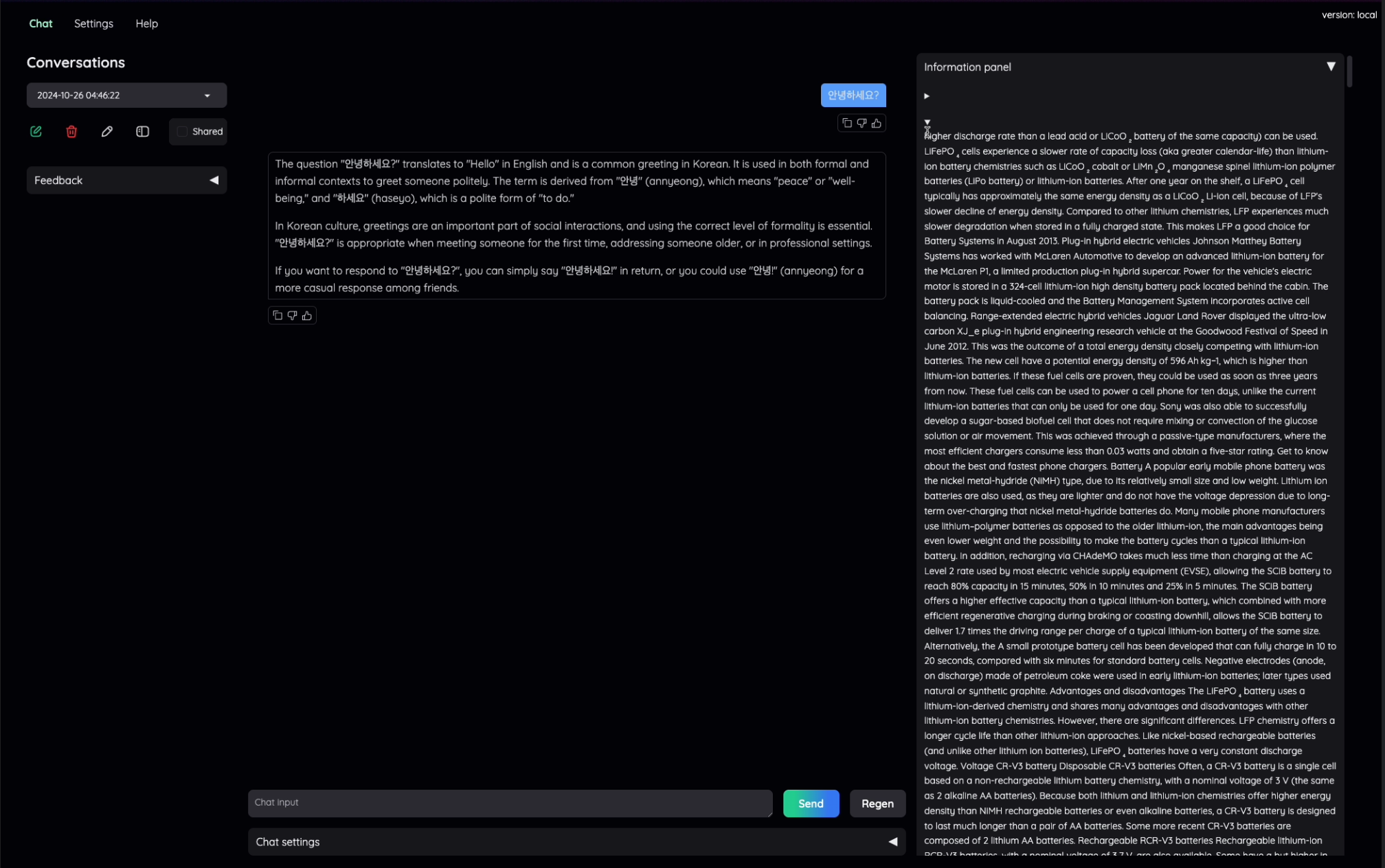
 ### Use advanced web interface
You can deploy the advanced web interface featured by [Kotaemon](https://github.com/Cinnamon/kotaemon) to the fly.io.
Go [here](https://github.com/vkehfdl1/AutoRAG-web-kotaemon) to use it and deploy to the fly.io.
Example :
## 📌 Supporting Data Creation Modules

- You can check our all Parsing Modules at [here](https://edai.notion.site/Supporting-Parse-Modules-e0b7579c7c0e4fb2963e408eeccddd75?pvs=4)
- You can check our all Chunk Modules at [here](https://edai.notion.site/Supporting-Chunk-Modules-8db803dba2ec4cd0a8789659106e86a3?pvs=4)
## ❗Supporting RAG Optimization Nodes & modules


You can check our all supporting Nodes & modules
at [here](https://edai.notion.site/Supporting-Nodes-modules-0ebc7810649f4e41aead472a92976be4?pvs=4)
## ❗Supporting Evaluation Metrics

You can check our all supporting Evaluation Metrics
at [here](https://edai.notion.site/Supporting-metrics-867d71caefd7401c9264dd91ba406043?pvs=4)
- [Retrieval Metrics](https://edai.notion.site/Retrieval-Metrics-dde3d9fa1d9547cdb8b31b94060d21e7?pvs=4)
- [Retrieval Token Metrics](https://edai.notion.site/Retrieval-Token-Metrics-c3e2d83358e04510a34b80429ebb543f?pvs=4)
- [Generation Metrics](https://github.com/user-attachments/assets/7d4a3069-9186-4854-885d-ca0f7bcc17e8)
## ☎️ FaQ
🛣️ [Roadmap](https://github.com/orgs/Auto-RAG/projects/1/views/2)
💻 [Hardware Specs](https://edai.notion.site/Hardware-specs-28cefcf2a26246ffadc91e2f3dc3d61c?pvs=4)
⭐ [Running AutoRAG](https://edai.notion.site/About-running-AutoRAG-44a8058307af42068fc218a073ee480b?pvs=4)
🍯 [Tips/Tricks](https://edai.notion.site/Tips-Tricks-10708a0e36ff461cb8a5d4fb3279ff15?pvs=4)
☎️ [TroubleShooting](https://medium.com/@autorag/autorag-troubleshooting-5cf872b100e3)
## 💬 Talk with Founders
Talk with us! We are always open to talk with you.
- 🎤 [Talk with Jeffrey](https://zcal.co/autorag-jeffrey/autorag-demo-15min)
- 🦜 [Talk with Bwook](https://zcal.co/i/tcuLtmq5)
---
# ✨ Contributors ✨
Thanks go to these wonderful people:
### Use advanced web interface
You can deploy the advanced web interface featured by [Kotaemon](https://github.com/Cinnamon/kotaemon) to the fly.io.
Go [here](https://github.com/vkehfdl1/AutoRAG-web-kotaemon) to use it and deploy to the fly.io.
Example :

## 📌 Supporting Data Creation Modules

- You can check our all Parsing Modules at [here](https://edai.notion.site/Supporting-Parse-Modules-e0b7579c7c0e4fb2963e408eeccddd75?pvs=4)
- You can check our all Chunk Modules at [here](https://edai.notion.site/Supporting-Chunk-Modules-8db803dba2ec4cd0a8789659106e86a3?pvs=4)
## ❗Supporting RAG Optimization Nodes & modules


You can check our all supporting Nodes & modules
at [here](https://edai.notion.site/Supporting-Nodes-modules-0ebc7810649f4e41aead472a92976be4?pvs=4)
## ❗Supporting Evaluation Metrics

You can check our all supporting Evaluation Metrics
at [here](https://edai.notion.site/Supporting-metrics-867d71caefd7401c9264dd91ba406043?pvs=4)
- [Retrieval Metrics](https://edai.notion.site/Retrieval-Metrics-dde3d9fa1d9547cdb8b31b94060d21e7?pvs=4)
- [Retrieval Token Metrics](https://edai.notion.site/Retrieval-Token-Metrics-c3e2d83358e04510a34b80429ebb543f?pvs=4)
- [Generation Metrics](https://github.com/user-attachments/assets/7d4a3069-9186-4854-885d-ca0f7bcc17e8)
## ☎️ FaQ
🛣️ [Roadmap](https://github.com/orgs/Auto-RAG/projects/1/views/2)
💻 [Hardware Specs](https://edai.notion.site/Hardware-specs-28cefcf2a26246ffadc91e2f3dc3d61c?pvs=4)
⭐ [Running AutoRAG](https://edai.notion.site/About-running-AutoRAG-44a8058307af42068fc218a073ee480b?pvs=4)
🍯 [Tips/Tricks](https://edai.notion.site/Tips-Tricks-10708a0e36ff461cb8a5d4fb3279ff15?pvs=4)
☎️ [TroubleShooting](https://medium.com/@autorag/autorag-troubleshooting-5cf872b100e3)
## 💬 Talk with Founders
Talk with us! We are always open to talk with you.
- 🎤 [Talk with Jeffrey](https://zcal.co/autorag-jeffrey/autorag-demo-15min)
- 🦜 [Talk with Bwook](https://zcal.co/i/tcuLtmq5)
---
# ✨ Contributors ✨
Thanks go to these wonderful people:
 # Contribution
We are developing AutoRAG as open-source.
So this project welcomes contributions and suggestions. Feel free to contribute to this project.
Plus, check out our detailed documentation at [here](https://docs.auto-rag.com/index.html).
# Contribution
We are developing AutoRAG as open-source.
So this project welcomes contributions and suggestions. Feel free to contribute to this project.
Plus, check out our detailed documentation at [here](https://docs.auto-rag.com/index.html).