# HuskarUI
**Repository Path**: xxz_code_space/HuskarUI
## Basic Information
- **Project Name**: HuskarUI
- **Description**: * 此仓库为 Github 镜像仓库 - 「 HuskarUI」 基于 Qml 的 Ant-d UI 套件
- **Primary Language**: C++
- **License**: MIT
- **Default Branch**: master
- **Homepage**: https://github.com/mengps/HuskarUI
- **GVP Project**: No
## Statistics
- **Stars**: 0
- **Forks**: 34
- **Created**: 2025-09-21
- **Last Updated**: 2025-09-21
## Categories & Tags
**Categories**: Uncategorized
**Tags**: None
## README

# 「 HuskarUI 」 Modern UI for Qml
Ant Design component library for Qt Qml
If you need Qt5 impl [HuskarUI for Qt5](https://github.com/mengps/HuskarUI_Qt5)
![win-badge] ![linux-badge] ![macos-badge] ![android-badge]
[![Issues][issues-open-image]][issues-open-url] [![Issues][issues-close-image]][issues-close-url] [![Release][release-image]][release-url]
[![QQGroup][qqgroup-image]][qqgroup-url]
English | [中文](./README-zh_CN.md)
[win-badge]: https://img.shields.io/badge/Windows-passing-brightgreen?style=flat-square
[linux-badge]: https://img.shields.io/badge/Linux-passing-brightgreen?style=flat-square
[macos-badge]: https://img.shields.io/badge/MacOS-passing-brightgreen?style=flat-square
[android-badge]: https://img.shields.io/badge/Android-passing-brightgreen?style=flat-square
[issues-open-image]: https://img.shields.io/github/issues/mengps/HuskarUI?label=Issue&style=flat-square
[issues-open-url]: https://github.com/mengps/HuskarUI/issues
[issues-close-image]: https://img.shields.io/github/issues-closed/mengps/HuskarUI?color=brightgreen&label=Issue&style=flat-square
[issues-close-url]: https://github.com/mengps/HuskarUI/issues?q=is%3Aissue%20state%3Aclosed
[release-image]: https://img.shields.io/github/v/release/mengps/HuskarUI?label=Release&style=flat-square
[release-url]: https://github.com/mengps/HuskarUI/releases
[qqgroup-image]: https://img.shields.io/badge/QQGroup-490328047-f74658?style=flat-square
[qqgroup-url]: https://qm.qq.com/q/cMNHn2tWeY
## ✨ Features
- 📦 A set of high-quality Qml components out of the box.
- 🎨 Powerful theme customization system.
- 💻 Based on Qml, completely cross platform.
- 🔧 Highly flexible delegate based component customization.
## 🗺️ Roadmap
The development plan can be found here: [Component Roadmap](https://github.com/mengps/HuskarUI/discussions/5).
Anyone can discuss through issues, QQ groups, or WeChat groups, and ultimately meaningful components/functions will be added to the development plan.
## 📺 Online Demo
- [BiliBili](https://www.bilibili.com/video/BV1jodhYhE8a/?spm_id_from=333.1387.homepage.video_card.click)
## 🗂️ Precompiled package
Precompiled packages and binary libraries for two platforms, `Windows / Linux`, have been created.
Please visit [Release](https://github.com/mengps/HuskarUI/releases) to download.
## 🔨 How to Build
- Clone
```auto
git clone --recursive https://github.com/mengps/HuskarUI.git
```
- Build
```cmake
cd HuskarUI
cmake -S . -B build
cmake --build build --config Release --target all --parallel
```
By default, the `plugin` will be builded in the `[QtDir]/[QtVersion]/[Kit]/qml/HuskarUI` directory.
- Install
```cmake
cmake --install --prefix
```
The installation directory structure
```auto
──
├─include
│ *.h
├─bin
│ *.dll
├─lib
│ *.lib/so
└─imports
└─HuskarUI/Basic
```
- Usage
- Link the `/lib`.
- Include the `/include`.
- Copy the `/bin/HuskarUIBasic.[dll/so]` to `[QtDir]/[QtVersion]/[Kit]/bin`.
- Copy the `/imports/HuskarUI` to `[QtDir]/[QtVersion]/[Kit]/qml`.
## 📦 Get started
- Create QtQuick application `QtVersion >= 6.7`
- Add the following cmake command to your project `CMakeLists.txt`
```cmake
target_include_directories( PRIVATE HuskarUI/include)
target_link_directories( PRIVATE HuskarUI/lib)
target_link_libraries( PRIVATE HuskarUIBasic)
```
- Add the following code to your `main.cpp`
```cpp
#include "huspp.h"
int main(int argc, char *argv[])
{
...
/*! Set OpenGL, optional */
QQuickWindow::setGraphicsApi(QSGRendererInterface::OpenGL);
QQuickWindow::setDefaultAlphaBuffer(true);
...
QGuiApplication app(argc, argv);
QQmlApplicationEngine engine;
HusApp::initialize(&engine);
...
}
```
- Add the following code to your `.qml`
```qml
import HuskarUI.Basic
HusWindow {
...
}
```
Alright, you can now enjoy using HuskarUI.
## 🚩 Reference
- Ant-d Components: https://ant-design.antgroup.com/components/overview
- Ant Design: https://ant-design.antgroup.com/docs/spec/introduce
## 💓 LICENSE
Use `MIT LICENSE`
## 🌇 Environment
Windows 11 / Ubuntu 24.04.2, Qt Version >= 6.7
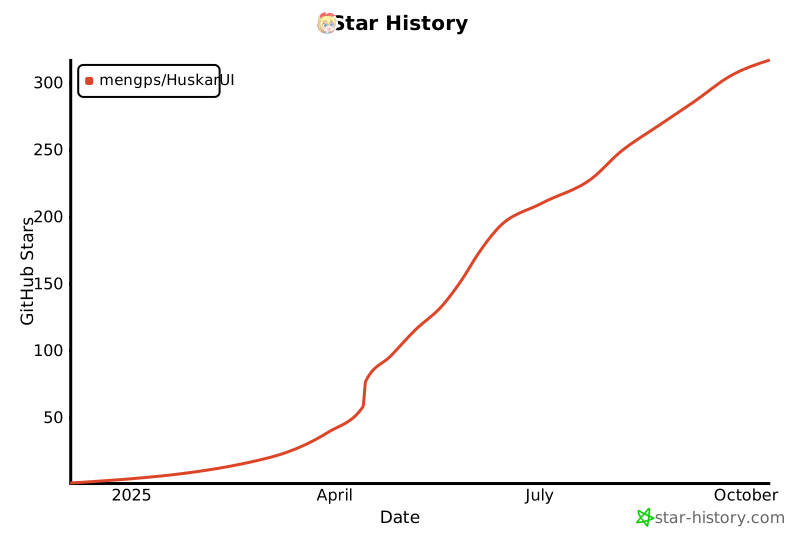
## 🎉 Star History
[](https://star-history.com/#mengps/HuskarUI&Date) 

