# php-pm
**Repository Path**: third-repo/php-pm
## Basic Information
- **Project Name**: php-pm
- **Description**: No description available
- **Primary Language**: Unknown
- **License**: MIT
- **Default Branch**: master
- **Homepage**: None
- **GVP Project**: No
## Statistics
- **Stars**: 0
- **Forks**: 0
- **Created**: 2020-12-07
- **Last Updated**: 2021-12-17
## Categories & Tags
**Categories**: Uncategorized
**Tags**: None
## README
PPM - PHP Process Manager
====================================================

PHP-PM is a process manager, supercharger and load balancer for PHP applications.
[](https://travis-ci.org/php-pm/php-pm)
[](https://gitter.im/php-pm/php-pm?utm_source=badge&utm_medium=badge&utm_campaign=pr-badge)
It's based on ReactPHP and works best with applications that use request-response frameworks like Symfony's HTTPKernel.
The approach of this is to kill the expensive bootstrap of PHP (declaring symbols, loading/parsing files) and the bootstrap of feature-rich frameworks. See Performance section for a quick hint.
PHP-PM basically spawns several PHP instances as worker bootstraping your application (eg. the whole Symfony Kernel) and hold it in the memory to be prepared for every
incoming request: This is why PHP-PM makes your application so fast.
More information can be found in the article: [Bring High Performance Into Your PHP App (with ReactPHP)](https://web.archive.org/web/20190103202024/http://marcjschmidt.de/2014/02/08/php-high-performance/)
### Features
* Performance boost up to 15x (compared to PHP-FPM, Symfony applications).
* Integrated load balancer.
* Hot-Code reload (when PHP files change).
* Static file serving for easy development procedures.
* Support for HttpKernel (Symfony/Laravel), Drupal (experimental), Zend (experimental).
### Badge all the things
Does your app/library support PPM? Show it!
[](https://github.com/php-pm/php-pm)
```
[](https://github.com/php-pm/php-pm)
```
#### Use
```bash
cd into/your-application
# run Symfony
docker run -v `pwd`:/var/www -p 8080:80 phppm/nginx --bootstrap=symfony --static-directory=web/
# run Laravel
docker run -v `pwd`:/var/www -p 8080:80 phppm/nginx --bootstrap=laravel --static-directory=public/
```
Docker is easier to setup and maintain. If your applications requires additional environment tools or libraries,
you can build your own image based on ours. See [github.com/php-pm/php-pm-docker](https://github.com/php-pm/php-pm-docker) for more information.
When `debug` is enabled, PHP-PM detects file changes and restarts its worker automatically.
#### Use without Docker
Follow the wiki article [Use without Docker](https://github.com/php-pm/php-pm/wiki/Use-without-Docker).
#### Performance
To get the maximum performance you should usually use `--app-env=prod` with disabled
debug `--debug=0`. Also make sure xdebug is disabled. Try with different amount of workers.
Usually a 10% over your cpu core count is good. Example: If you have 8 real cores (excl. hyper-threading) use `--workers=9`.
To get even more performance (for static file serving or for rather fast applications) try a different event loop (see https://github.com/reactphp/event-loop).
#### Debugging
If you get strange issues in your application and you have no idea where they are coming from try
using only one worker `--workers=1` and enable `-v` or `-vv`.
When debugging you should use xdebug as you're used to. If you set a break point and hold the application, then only one
worker is stopped until you release the break point. All other workers are fully functional.
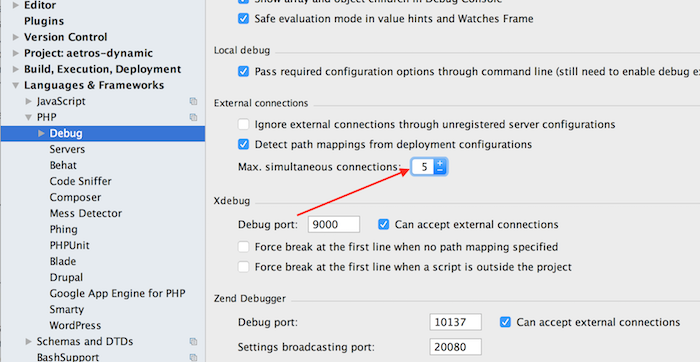
**Note for XDebug and PHPStorm**: Since php-pm uses at least two processes, there are two xdebug instances as well. PHPStorm is per default configured to only accept one connection at a time. You need to increase that. You won't get xdebug working with your application if you don't increase that count.
In all workers the STDOUT is redirected to the connected client. So take care, `var_dump`, `echo` are not displayed on the console.
STDERR is not redirected to the client, but to the console. So, for very simple debugging you could use `error_log('hi')` and you'll see it on the console.
Per default exceptions and errors are only displayed on the console, prettified with Symfony/Debug component.
### Adapter
**HttpKernel for Symfony/Laravel** - https://github.com/php-pm/php-pm-httpkernel
**Zend** - https://github.com/php-pm/php-pm-zend
**CakePHP** - https://github.com/CakeDC/cakephp-phppm
### Command
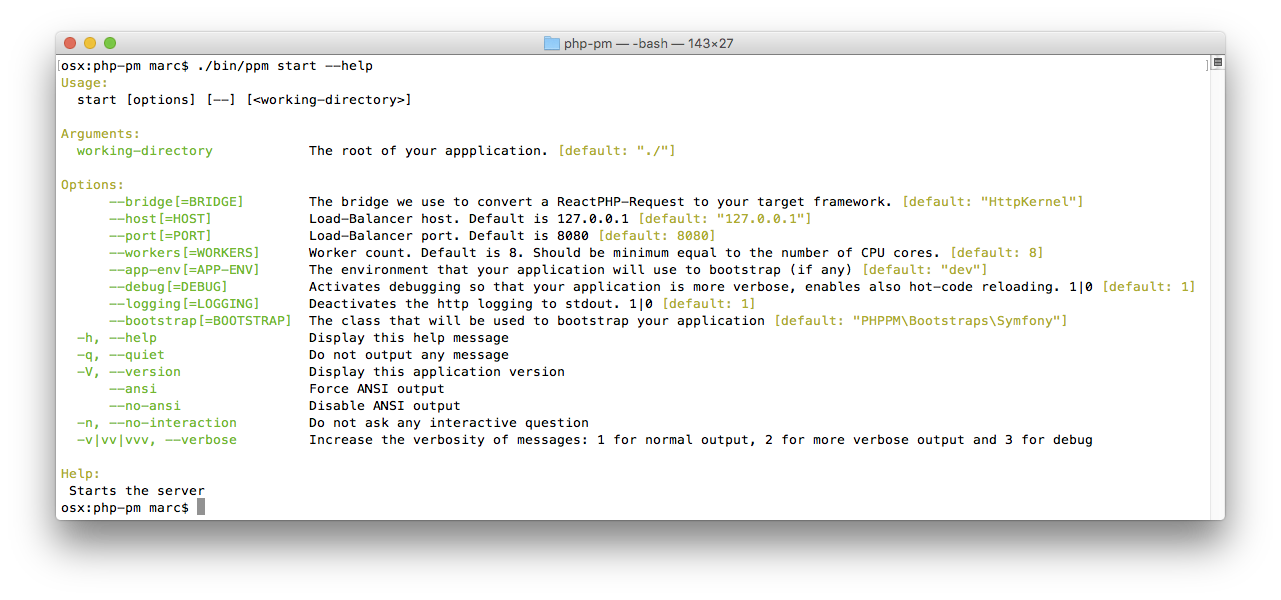
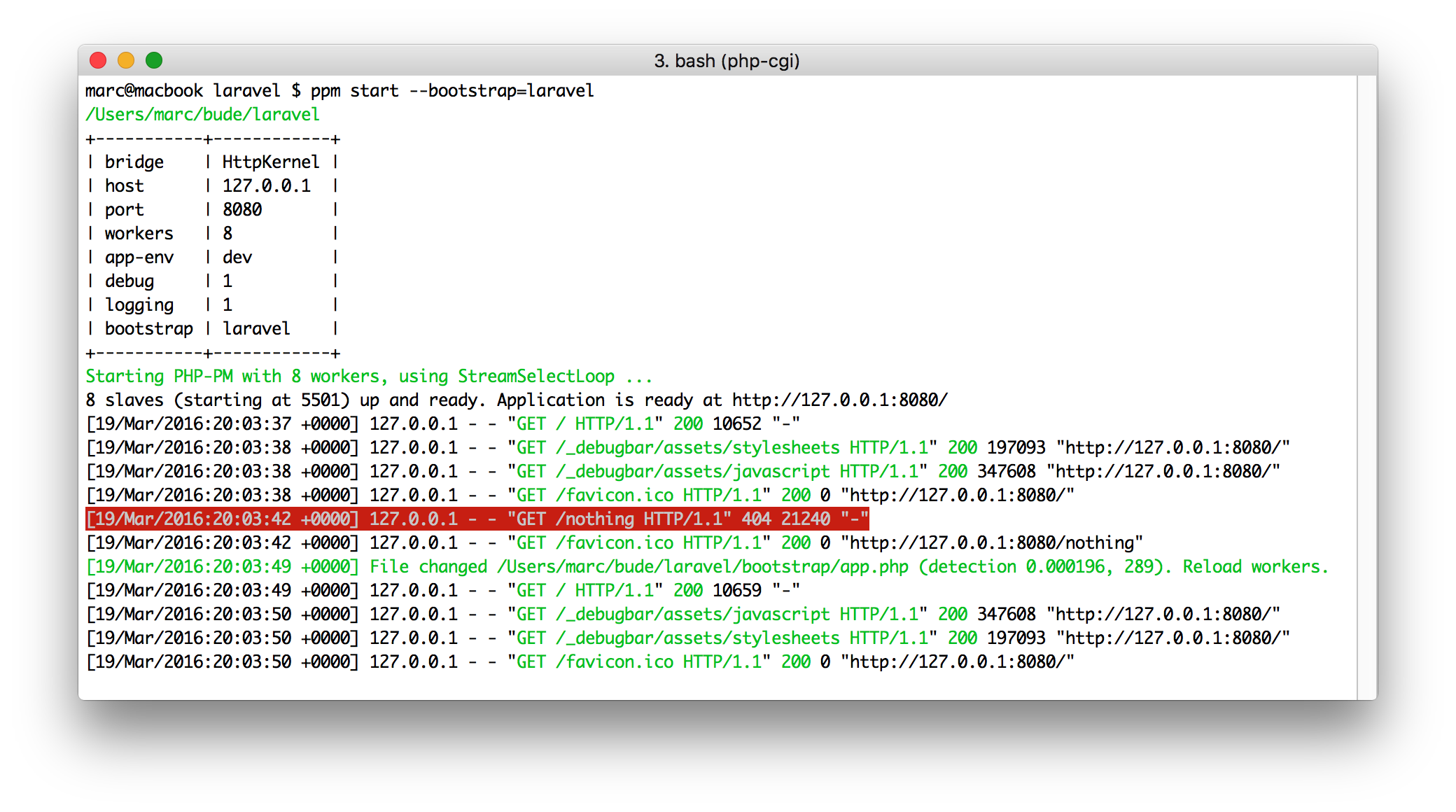
#### Symfony
```bash
cd my-project
docker run -v `pwd`:/var/www -p 8080:80 phppm/nginx --static-directory=web/
```
#### Laravel
```bash
cd my-project
docker run -v `pwd`:/var/www -p 8080:80 phppm/nginx --bootstrap=laravel --static-directory=web/
```
#### Zend
```bash
cd my-project
docker run -v `pwd`:/var/www -p 8080:80 phppm/nginx --bootstrap=Zf2
```
#### Wordpress
For all Wordpress lovers out there: PPM is not going to work with Wordpress due to the lack of request-response abstraction.
We highly doubt that Wordpress is ever going to be compatible because its architecture is written in a way that makes it
currently impossible to serve multiple requests in one application process.
### Performance (requests/s)
6x4GHz Intel i7, 16GB RAM. 10 concurrent, 1000 total request: `ab -c 10 -n 1000 http://127.0.0.1:8080/`
#### Symfony, CMS application
`ppm start --bootstrap=symfony --app-env=prod --logging=0 --debug=0 --workers=20`
https://github.com/jarves/jarves
| PHP Version | Dynamic at Jarves | Static file |
|--------------------------|-------------------|-------------|
| 7.0.3, StreamSelectLoop | 2387,67 | 3944,52 |
| 5.6.18, StreamSelectLoop | 1663,56 | 2636,09 |
| 5.6.18, LibEventLoop | 1811,76 | 3441,72 |
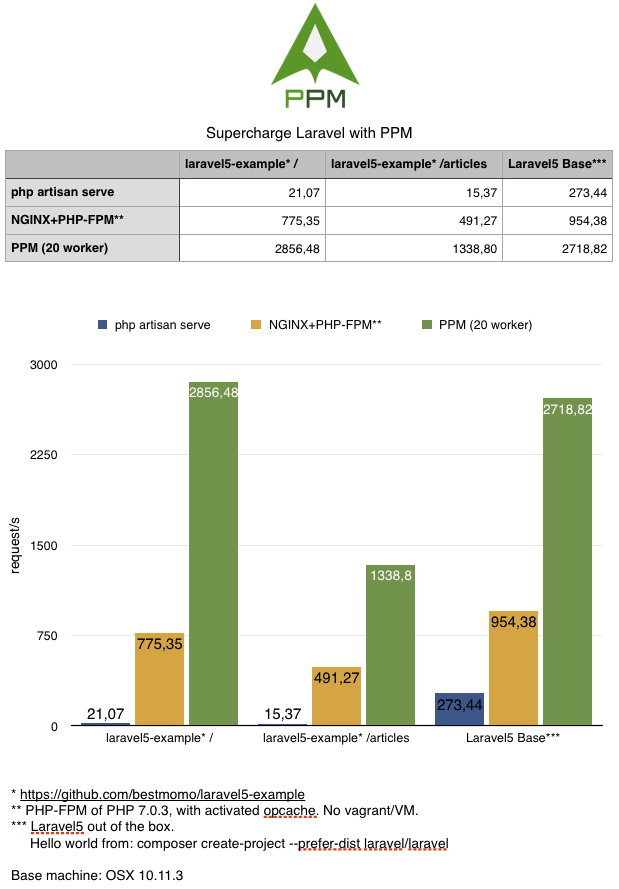
#### Laravel, example package
https://github.com/bestmomo/laravel5-example
`ppm start --bootstrap=laravel --app-env=prod --debug=0 --logging=0 --workers=20`
## Issues
* Memory leaks, memory leaks and memory leaks. You will also find leaks in your application. :) But no big issue since workers restart automatically.
* Does not work with ExtEventLoop. (So don't install `php70-event`, but you can try LibEventLoop `php56-libevent`)
* Drupal and Zend is very experimental and not fully working. Try using https://github.com/php-pm/php-pm-drupal.
* Laravel's debugger isn't working perfectly yet since it's still needed to reset some stuff after each request.
* Streamed responses are not streamed yet
* No windows support due to signal handling
Please help us fix these issues by creating pull requests. :)
### Setup
We provide ready-to-use docker images you can use right away.
If you have own setup, see in the [PHP-PM docker repository](https://github.com/php-pm/php-pm-docker) how to integrate PHP-PM in your NGiNX setup.
#### Trusted proxy Symfony
To get the real remote IP in your Symfony application for example, don't forget to add ppm (default `127.0.0.1`)
as trusted reverse proxy.
```yml
# app/config/config.yml
# ...
framework:
trusted_proxies: [127.0.0.1]
```
More information at http://symfony.com/doc/current/cookbook/request/load_balancer_reverse_proxy.html.