# mimiclaw
**Repository Path**: sklink/mimiclaw
## Basic Information
- **Project Name**: mimiclaw
- **Description**: MimiClaw: Run OpenClaw on a $5 chip. No OS(Linux). No Node.js. No Mac mini. No Raspberry Pi. No VPS.😗Local-first memory. Shareable. Portable. Privacy-first. Smarter than PicoClaw.
- **Primary Language**: Unknown
- **License**: MIT
- **Default Branch**: main
- **Homepage**: None
- **GVP Project**: No
## Statistics
- **Stars**: 0
- **Forks**: 5
- **Created**: 2026-03-15
- **Last Updated**: 2026-03-25
## Categories & Tags
**Categories**: Uncategorized
**Tags**: None
## README
# MimiClaw: Pocket AI Assistant on a $5 Chip





English | 中文 | 日本語
**The world's first AI assistant(OpenClaw) on a $5 chip. No Linux. No Node.js. Just pure C**
MimiClaw turns a tiny ESP32-S3 board into a personal AI assistant. Plug it into USB power, connect to WiFi, and talk to it through Telegram — it handles any task you throw at it and evolves over time with local memory — all on a chip the size of a thumb.
## Meet MimiClaw
- **Tiny** — No Linux, no Node.js, no bloat — just pure C
- **Handy** — Message it from Telegram, it handles the rest
- **Loyal** — Learns from memory, remembers across reboots
- **Energetic** — USB power, 0.5 W, runs 24/7
- **Lovable** — One ESP32-S3 board, $5, nothing else
## How It Works

You send a message on Telegram. The ESP32-S3 picks it up over WiFi, feeds it into an agent loop — the LLM thinks, calls tools, reads memory — and sends the reply back. Supports both **Anthropic (Claude)** and **OpenAI (GPT)** as providers, switchable at runtime. Everything runs on a single $5 chip with all your data stored locally on flash.
## Quick Start
### What You Need
- An **ESP32-S3 dev board** with 16 MB flash and 8 MB PSRAM (e.g. Xiaozhi AI board, ~$10)
- A **USB Type-C cable**
- A **Telegram bot token** — talk to [@BotFather](https://t.me/BotFather) on Telegram to create one
- An **Anthropic API key** — from [console.anthropic.com](https://console.anthropic.com), or an **OpenAI API key** — from [platform.openai.com](https://platform.openai.com)
### Install
```bash
# You need ESP-IDF v5.5+ installed first:
# https://docs.espressif.com/projects/esp-idf/en/v5.5.2/esp32s3/get-started/
git clone https://github.com/memovai/mimiclaw.git
cd mimiclaw
idf.py set-target esp32s3
```
Ubuntu Install
Recommended baseline:
- Ubuntu 22.04/24.04
- Python >= 3.10
- CMake >= 3.16
- Ninja >= 1.10
- Git >= 2.34
- flex >= 2.6
- bison >= 3.8
- gperf >= 3.1
- dfu-util >= 0.11
- `libusb-1.0-0`, `libffi-dev`, `libssl-dev`
Install and build on Ubuntu:
```bash
sudo apt-get update
sudo apt-get install -y git wget flex bison gperf python3 python3-pip python3-venv \
cmake ninja-build ccache libffi-dev libssl-dev dfu-util libusb-1.0-0
./scripts/setup_idf_ubuntu.sh
./scripts/build_ubuntu.sh
```
macOS Install
Recommended baseline:
- macOS 12/13/14
- Xcode Command Line Tools
- Homebrew
- Python >= 3.10
- CMake >= 3.16
- Ninja >= 1.10
- Git >= 2.34
- flex >= 2.6
- bison >= 3.8
- gperf >= 3.1
- dfu-util >= 0.11
- `libusb`, `libffi`, `openssl`
Install and build on macOS:
```bash
xcode-select --install
/bin/bash -c "$(curl -fsSL https://raw.githubusercontent.com/Homebrew/install/HEAD/install.sh)"
./scripts/setup_idf_macos.sh
./scripts/build_macos.sh
```
### Configure
MimiClaw uses a **two-layer config** system: build-time defaults in `mimi_secrets.h`, with runtime overrides via the serial CLI. CLI values are stored in NVS flash and take priority over build-time values.
```bash
cp main/mimi_secrets.h.example main/mimi_secrets.h
```
Edit `main/mimi_secrets.h`:
```c
#define MIMI_SECRET_WIFI_SSID "YourWiFiName"
#define MIMI_SECRET_WIFI_PASS "YourWiFiPassword"
#define MIMI_SECRET_TG_TOKEN "123456:ABC-DEF1234ghIkl-zyx57W2v1u123ew11"
#define MIMI_SECRET_API_KEY "sk-ant-api03-xxxxx"
#define MIMI_SECRET_MODEL_PROVIDER "anthropic" // "anthropic" or "openai"
#define MIMI_SECRET_SEARCH_KEY "" // optional: Brave Search API key
#define MIMI_SECRET_PROXY_HOST "" // optional: e.g. "10.0.0.1"
#define MIMI_SECRET_PROXY_PORT "" // optional: e.g. "7897"
```
Then build and flash:
```bash
# Clean build (required after any mimi_secrets.h change)
idf.py fullclean && idf.py build
# Find your serial port
ls /dev/cu.usb* # macOS
ls /dev/ttyACM* # Linux
# Flash and monitor (replace PORT with your port)
# USB adapter: likely /dev/cu.usbmodem11401 (macOS) or /dev/ttyACM0 (Linux)
idf.py -p PORT flash monitor
```
> **Important: Plug into the correct USB port!** Most ESP32-S3 boards have two USB-C ports. You must use the one labeled **USB** (native USB Serial/JTAG), **not** the one labeled **COM** (external UART bridge). Plugging into the wrong port will cause flash/monitor failures.
>
>
> Show reference photo
>
>  >
>
>
>
### CLI Commands (via UART/COM port)
Connect via serial to configure or debug. **Config commands** let you change settings without recompiling — just plug in a USB cable anywhere.
**Runtime config** (saved to NVS, overrides build-time defaults):
```
mimi> wifi_set MySSID MyPassword # change WiFi network
mimi> set_tg_token 123456:ABC... # change Telegram bot token
mimi> set_api_key sk-ant-api03-... # change API key (Anthropic or OpenAI)
mimi> set_model_provider openai # switch provider (anthropic|openai)
mimi> set_model gpt-4o # change LLM model
mimi> set_proxy 127.0.0.1 7897 # set HTTP proxy
mimi> clear_proxy # remove proxy
mimi> set_search_key BSA... # set Brave Search API key
mimi> config_show # show all config (masked)
mimi> config_reset # clear NVS, revert to build-time defaults
```
**Debug & maintenance:**
```
mimi> wifi_status # am I connected?
mimi> memory_read # see what the bot remembers
mimi> memory_write "content" # write to MEMORY.md
mimi> heap_info # how much RAM is free?
mimi> session_list # list all chat sessions
mimi> session_clear 12345 # wipe a conversation
mimi> heartbeat_trigger # manually trigger a heartbeat check
mimi> cron_start # start cron scheduler now
mimi> restart # reboot
```
### USB (JTAG) vs UART: Which Port for What
Most ESP32-S3 dev boards expose **two USB-C ports**:
| Port | Use for |
|------|---------|
| **USB** (JTAG) | `idf.py flash`, JTAG debugging |
| **COM** (UART) | **REPL CLI**, serial console |
> **REPL requires the UART (COM) port.** The USB (JTAG) port does not support interactive REPL input.
Port details & recommended workflow
| Port | Label | Protocol |
|------|-------|----------|
| **USB** | USB / JTAG | Native USB Serial/JTAG |
| **COM** | UART / COM | External UART bridge (CP2102/CH340) |
The ESP-IDF console/REPL is configured to use UART by default (`CONFIG_ESP_CONSOLE_UART_DEFAULT=y`).
**If you have both ports connected simultaneously:**
- USB (JTAG) handles flash/download and provides secondary serial output
- UART (COM) provides the primary interactive console for the REPL
- macOS: both appear as `/dev/cu.usbmodem*` or `/dev/cu.usbserial-*` — run `ls /dev/cu.usb*` to identify
- Linux: USB (JTAG) → `/dev/ttyACM0`, UART → `/dev/ttyUSB0`
**Recommended workflow:**
```bash
# Flash via USB (JTAG) port
idf.py -p /dev/cu.usbmodem11401 flash
# Open REPL via UART (COM) port
idf.py -p /dev/cu.usbserial-110 monitor
# or use any serial terminal: screen, minicom, PuTTY at 115200 baud
```
## Memory
MimiClaw stores everything as plain text files you can read and edit:
| File | What it is |
|------|------------|
| `SOUL.md` | The bot's personality — edit this to change how it behaves |
| `USER.md` | Info about you — name, preferences, language |
| `MEMORY.md` | Long-term memory — things the bot should always remember |
| `HEARTBEAT.md` | Task list the bot checks periodically and acts on autonomously |
| `cron.json` | Scheduled jobs — recurring or one-shot tasks created by the AI |
| `2026-02-05.md` | Daily notes — what happened today |
| `tg_12345.jsonl` | Chat history — your conversation with the bot |
## Tools
MimiClaw supports tool calling for both Anthropic and OpenAI — the LLM can call tools during a conversation and loop until the task is done (ReAct pattern).
| Tool | Description |
|------|-------------|
| `web_search` | Search the web via Brave Search API for current information |
| `get_current_time` | Fetch current date/time via HTTP and set the system clock |
| `cron_add` | Schedule a recurring or one-shot task (the LLM creates cron jobs on its own) |
| `cron_list` | List all scheduled cron jobs |
| `cron_remove` | Remove a cron job by ID |
To enable web search, set a [Brave Search API key](https://brave.com/search/api/) via `MIMI_SECRET_SEARCH_KEY` in `mimi_secrets.h`.
## Cron Tasks
MimiClaw has a built-in cron scheduler that lets the AI schedule its own tasks. The LLM can create recurring jobs ("every N seconds") or one-shot jobs ("at unix timestamp") via the `cron_add` tool. When a job fires, its message is injected into the agent loop — so the AI wakes up, processes the task, and responds.
Jobs are persisted to SPIFFS (`cron.json`) and survive reboots. Example use cases: daily summaries, periodic reminders, scheduled check-ins.
## Heartbeat
The heartbeat service periodically reads `HEARTBEAT.md` from SPIFFS and checks for actionable tasks. If uncompleted items are found (anything that isn't an empty line, a header, or a checked `- [x]` box), it sends a prompt to the agent loop so the AI can act on them autonomously.
This turns MimiClaw into a proactive assistant — write tasks to `HEARTBEAT.md` and the bot will pick them up on the next heartbeat cycle (default: every 30 minutes).
## Also Included
- **WebSocket gateway** on port 18789 — connect from your LAN with any WebSocket client
- **OTA updates** — flash new firmware over WiFi, no USB needed
- **Dual-core** — network I/O and AI processing run on separate CPU cores
- **HTTP proxy** — CONNECT tunnel support for restricted networks
- **Multi-provider** — supports both Anthropic (Claude) and OpenAI (GPT), switchable at runtime
- **Cron scheduler** — the AI can schedule its own recurring and one-shot tasks, persisted across reboots
- **Heartbeat** — periodically checks a task file and prompts the AI to act autonomously
- **Tool use** — ReAct agent loop with tool calling for both providers
## For Developers
Technical details live in the `docs/` folder:
- **[docs/ARCHITECTURE.md](docs/ARCHITECTURE.md)** — system design, module map, task layout, memory budget, protocols, flash partitions
- **[docs/TODO.md](docs/TODO.md)** — feature gap tracker and roadmap
## Contributing
Please read **[CONTRIBUTING.md](CONTRIBUTING.md)** before opening issues or pull requests.
## Contributors
Thanks to everyone who has contributed to MimiClaw.
 ## License
MIT
## Acknowledgments
Inspired by [OpenClaw](https://github.com/openclaw/openclaw) and [Nanobot](https://github.com/HKUDS/nanobot). MimiClaw reimplements the core AI agent architecture for embedded hardware — no Linux, no server, just a $5 chip.
## Star History
[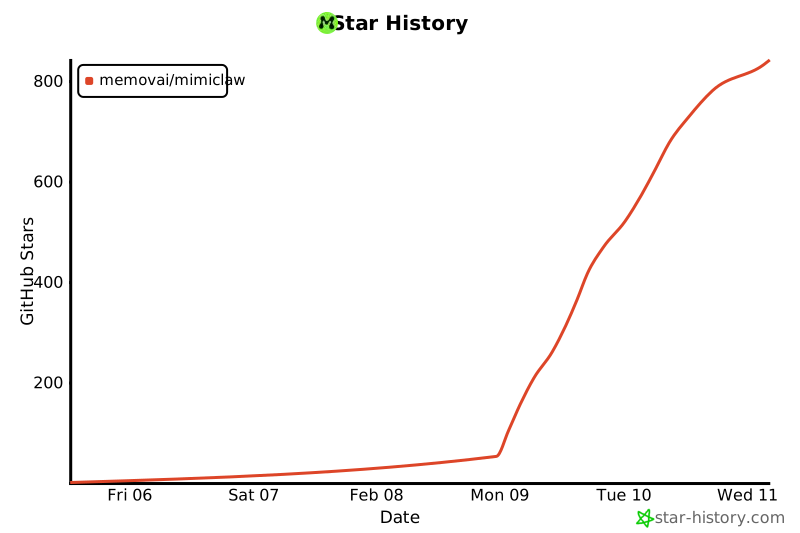](https://star-history.com/#memovai/mimiclaw&Date)
## License
MIT
## Acknowledgments
Inspired by [OpenClaw](https://github.com/openclaw/openclaw) and [Nanobot](https://github.com/HKUDS/nanobot). MimiClaw reimplements the core AI agent architecture for embedded hardware — no Linux, no server, just a $5 chip.
## Star History
[](https://star-history.com/#memovai/mimiclaw&Date)