# yalantinglibs
**Repository Path**: raincatc/yalantinglibs
## Basic Information
- **Project Name**: yalantinglibs
- **Description**: No description available
- **Primary Language**: C++
- **License**: Apache-2.0
- **Default Branch**: export_cmake_options
- **Homepage**: None
- **GVP Project**: No
## Statistics
- **Stars**: 0
- **Forks**: 0
- **Created**: 2024-10-10
- **Last Updated**: 2024-10-10
## Categories & Tags
**Categories**: Uncategorized
**Tags**: None
## README
yaLanTingLibs
A Collection of C++20 libraries, include struct_pack, struct_json, struct_xml, struct_yaml, struct_pb, easylog, coro_rpc, coro_http and async_simple



[中文版](./website/docs/zh/guide/what_is_yalantinglibs.md)
yaLanTingLibs is a collection of modern c++ util libraries, now it contains struct_pack, struct_json, struct_xml, struct_yaml, struct_pb, easylog, coro_rpc, coro_io, coro_http and async_simple, more and more cool libraries will be added into yaLanTingLibs in the future.
The target of yaLanTingLibs: provide very easy and high performance modern C++ libraries for developers, it can help to quickly build high performance applications.
| OS (Compiler Version) | Status |
|------------------------------------------------|-----------------------------------------------------------------------------------------------------------|
| Ubuntu 22.04 (clang 14.0.0) |  |
| Ubuntu 22.04 (gcc 11.2.0) |  |
| macOS Monterey 12 (AppleClang 14.0.0.14000029) |  |
| Windows Server 2022 (MSVC 19.33.31630.0) |  |
# Quick Start
## compiler requirements
If your compiler don't support C++20, yalantinglibs will only compile the serialization libraries (struct_pack, struct_json, struct_xml, struct_yaml, easylog support C++17).
Make sure you have such compilers:
- g++9 above;
- clang++6 above
- msvc 14.20 above;
Otherwise, yalantinglibs will compile all the libraries.
Make sure you have such compilers:
- g++10 above;
- clang++13 above
- msvc 14.29 above;
You can also use cmake option `-DENABLE_CPP_20=ON` or `-DENABLE_CPP_20=OFF` to control it.
## Install & Compile
Yalantinglibs is a head-only library. You can just copy `./include/ylt` directory into your project. But we suggest you use cmake to install it.
### Install
1. clone repo
```shell
git clone https://github.com/alibaba/yalantinglibs.git
cd yalantinglibs
mkdir build
cd build
```
2. build & test
- We suggest you compile the example and test the code first:
```shell
cmake ..
cmake --build . --config debug # add -j, if you have enough memory to parallel compile
ctest . # run tests
```
You can see the test/example/benchmark executable file in `./build/output/`.
- Or you can just skip build example/test/benchmark:
```shell
# You can use those option to skip build unit-test & benchmark & example:
cmake .. -DBUILD_EXAMPLES=OFF -DBUILD_BENCHMARK=OFF -DBUILD_UNIT_TESTS=OFF
cmake --build .
```
3. install
```shell
cmake --install . # --prefix ./user_defined_install_path
```
4. start develop
- Use Cmake:
After install ylt, copy then open the directory `src/*/examples`, then:
```shell
mkdir build
cd build
cmake ..
cmake --build .
```
### Cmake FetchContent
You can also import ylt by cmake FetchContent
```cmake
cmake_minimum_required(VERSION 3.15)
project(ylt_test)
include(FetchContent)
FetchContent_Declare(
yalantinglibs
GIT_REPOSITORY https://github.com/JYLeeLYJ/yalantinglibs.git
GIT_TAG feat/fetch # optional ( default master / main )
GIT_SHALLOW 1 # optional ( --depth=1 )
)
FetchContent_MakeAvailable(yalantinglibs)
add_executable(main main.cpp)
target_link_libraries(main yalantinglibs::yalantinglibs)
target_compile_features(main PRIVATE cxx_std_20)
```
### Compile Manually:
1. Add `include/` directory to include path(skip it if you have install ylt into system default path).
2. Add `include/ylt/thirdparty` to include path(skip it if you have install thirdparty independency by the cmake option -DINSTALL_INDEPENDENT_THIRDPARTY=ON).
3. Enable `c++20` standard by option `-std=c++20`(g++/clang++) or `/std:c++20`(msvc)
3. If you use any header with `coro_` prefix, add link option `-pthread` in linux and add option `-fcoroutines` when you use g++.
4. That's all. We could find other options in `example/cmakelist.txt`.
### More Details:
For more details, see the cmake file [here](https://github.com/alibaba/yalantinglibs/blob/main/CMakeLists.txt) and [there](https://github.com/alibaba/yalantinglibs/tree/main/cmake).
# Introduction
## coro_rpc
Very easy-to-use, coroutine-based, high performance rpc framework with C++20, more than 0.4M QPS per thread in pipeline mode. coro_rpc is a header only library.
You can finish a rpc server and rpc client in 5 minutes!
[English Introduction](https://alibaba.github.io/yalantinglibs/en/coro_rpc/coro_rpc_introduction.html)
[English API] (TODO)
[Talk (Chinese)](https://alibaba.github.io/yalantinglibs/coro_rpc_introduction_purecpp_talk.pdf) of coro_rpc on purecpp conference.
[Video (Chinese)](https://live.csdn.net/room/csdnlive1/bKFbKP7T) on purecpp conference, start from 04:55:08 of the video record.
### quick example
1.define a rpc function as a local normal function.
```cpp
// rpc_service.hpp
inline std::string_view echo(std::string_view str) { return str; }
```
2.register rpc function and start a server
```cpp
#include "rpc_service.hpp"
#include
int main() {
coro_rpc_server server(/*thread_num =*/10, /*port =*/9000);
server.register_handler(); // register function echo
server.start(); // start the server & block
}
```
3.rpc client call rpc service
```cpp
#include "rpc_service.hpp"
#include
Lazy test_client() {
coro_rpc_client client;
co_await client.connect("localhost", /*port =*/"9000"); // connect to the server
auto r = co_await client.call("hello coro_rpc"); // call remote function echo
std::cout << r.result.value() << "\n"; //will print "hello coro_rpc"
}
int main() {
syncAwait(test_client());
}
```
More examples [here](https://github.com/alibaba/yalantinglibs/tree/main/src/coro_rpc/examples).
## struct_pack
Based on compile-time reflection, very easy to use, high performance serialization library, struct_pack is a header only library, it is used by coro_rpc now.
Only one line code to finish serialization and deserialization, 2-20x faster than protobuf.
### quick example
```cpp
struct person {
int64_t id;
std::string name;
int age;
double salary;
};
person person1{.id = 1, .name = "hello struct pack", .age = 20, .salary = 1024.42};
// one line code serialize
std::vector buffer = struct_pack::serialize(person1);
// one line code deserialization
auto person2 = deserialize(buffer);
```
struct_pack is very fast.
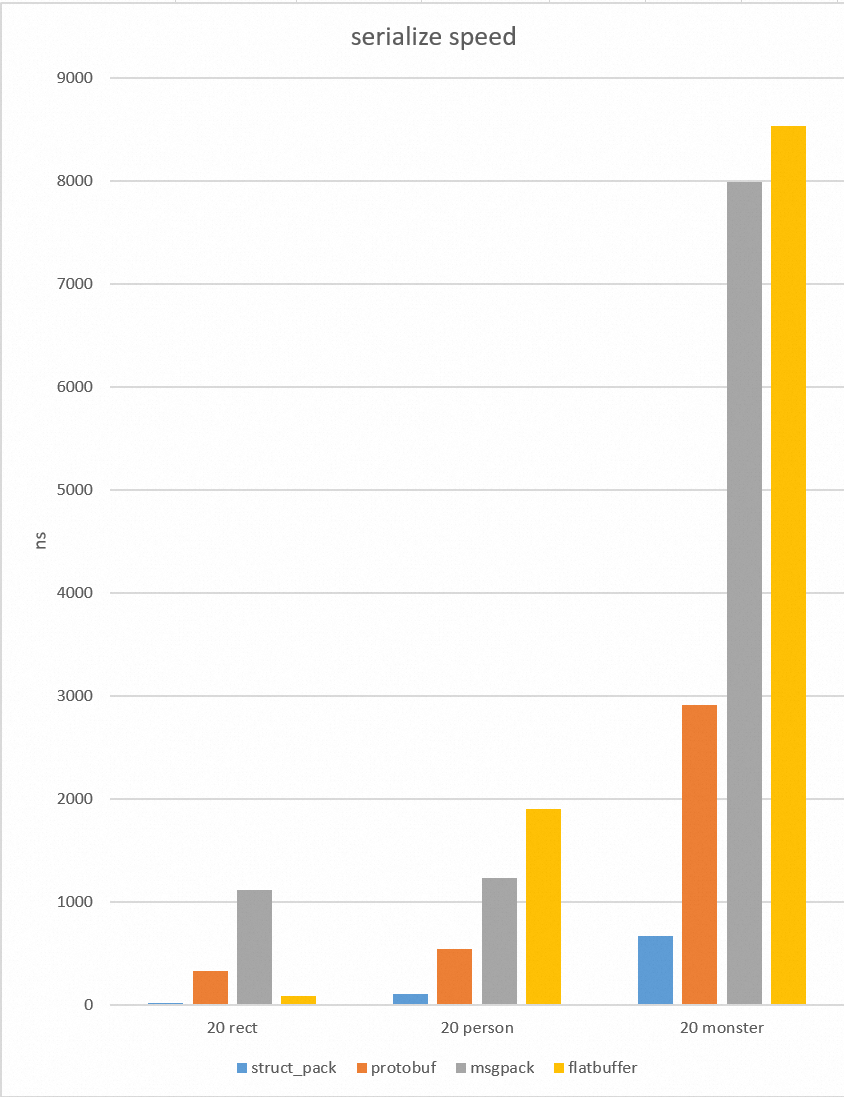
[English Introduction](https://alibaba.github.io/yalantinglibs/en/struct_pack/struct_pack_intro.html)
[English API] (TODO)
[(Slides) A Faster Serialization Library Based on Compile-time Reflection and C++ 20](https://alibaba.github.io/yalantinglibs/resource/A%20Faster%20Serialization%20Library%20Based%20on%20Compile-time%20Reflection%20and%20C++%2020.pdf) of struct_pack on CppCon2022
[(Video) A Faster Serialization Library Based on Compile-time Reflection and C++ 20](https://www.youtube.com/watch?v=myhB8ZlwOlE) on cppcon2022
[(Slides)(Chinese)](https://alibaba.github.io/yalantinglibs/resource/CppSummit_struct_pack.pdf) of struct_pack on purecpp conference.
[(Video)(Chinese)](https://live.csdn.net/room/csdnlive1/bKFbKP7T) on purecpp conference, start from 01:32:20 of the video record.
See more examples [here](https://alibaba.github.io/yalantinglibs/en/struct_pack/struct_pack_intro.html#serialization).
## struct_json
reflection-based json lib, very easy to do struct to json and json to struct.
### quick example
```cpp
#include "ylt/struct_json/json_reader.h"
#include "ylt/struct_json/json_writer.h"
struct person {
std::string name;
int age;
};
REFLECTION(person, name, age);
int main() {
person p{.name = "tom", .age = 20};
std::string str;
struct_json::to_json(p, str); // {"name":"tom","age":20}
person p1;
struct_json::from_json(p1, str);
}
```
## struct_xml
reflection-based xml lib, very easy to do struct to xml and xml to struct.
### quick example
```cpp
#include "ylt/struct_xml/xml_reader.h"
#include "ylt/struct_xml/xml_writer.h"
struct person {
std::string name;
int age;
};
REFLECTION(person, name, age);
void basic_usage() {
std::string xml = R"(
tom
20
)";
person p;
bool r = struct_xml::from_xml(p, xml.data());
assert(r);
assert(p.name == "tom" && p.age == 20);
std::string str;
r = struct_xml::to_xml_pretty(p, str);
assert(r);
std::cout << str;
}
```
## struct_yaml
reflection-based yaml lib, very easy to do struct to yaml and yaml to struct.
### quick example
```cpp
#include "ylt/struct_yaml/yaml_reader.h"
#include "ylt/struct_yaml/yaml_writer.h"
struct person {
std::string name;
int age;
};
REFLECTION(person, name, age);
void basic_usage() {
// serialization the structure to the string
person p = {"admin", 20};
std::string ss;
struct_yaml::to_yaml(ss, p);
std::cout << ss << std::endl;
std::string yaml = R"(
name : tom
age : 30
)";
// deserialization the structure from the string
struct_yaml::from_yaml(p, yaml);
}
```
## coro_http
coro_http is a C++20 coroutine http(https) client, include: get/post, websocket, multipart file upload, chunked and ranges download etc.
### get/post
```c++
#include "ylt/coro_http/coro_http_client.hpp"
using namespace coro_http;
async_simple::coro::Lazy get_post(coro_http_client &client) {
std::string uri = "http://www.example.com";
auto result = co_await client.async_get(uri);
std::cout << result.status << "\n";
result = co_await client.async_post(uri, "hello", req_content_type::string);
std::cout << result.status << "\n";
}
int main() {
coro_http_client client{};
async_simple::coro::syncAwait(get_post(client));
}
```
### websocket
```c++
async_simple::coro::Lazy websocket(coro_http_client &client) {
client.on_ws_close([](std::string_view reason) {
std::cout << "web socket close " << reason << std::endl;
});
client.on_ws_msg([](resp_data data) {
std::cout << data.resp_body << std::endl;
});
// connect to your websocket server.
bool r = co_await client.async_connect("ws://example.com/ws");
if (!r) {
co_return;
}
co_await client.async_send_ws("hello websocket");
co_await client.async_send_ws("test again", /*need_mask = */ false);
co_await client.async_send_ws_close("ws close reason");
}
```
### upload/download
```c++
async_simple::coro::Lazy upload_files(coro_http_client &client) {
std::string uri = "http://example.com";
client.add_str_part("hello", "world");
client.add_str_part("key", "value");
client.add_file_part("test", "test.jpg");
auto result = co_await client.async_upload(uri);
std::cout << result.status << "\n";
result = co_await client.async_upload(uri, "test", "test.jpg");
}
async_simple::coro::Lazy download_files(coro_http_client &client) {
// chunked download
auto result = co_await client.async_download("http://example.com/test.jpg",
"myfile.jpg");
std::cout << result.status << "\n";
// ranges download
result = co_await client.async_download("http://example.com/test.txt",
"myfile.txt", "1-10,11-16");
std::cout << result.status << "\n";
}
```
## async_simple
A C++ 20 coroutine library offering simple, light-weight and easy-to-use components to write asynchronous codes.
See [async_simple](https://github.com/alibaba/async_simple)
# Details
## CMAKE OPTION
These CMake options is used for yalantinglibs developing/installing itself. They are not effected for your project, because ylt is a head-only.
### INSTALL OPTION
|option|default value|
|----------|------------|
|INSTALL_THIRDPARTY|ON|
|INSTALL_INDEPENDENT_THIRDPARTY|OFF|
### ylt develop option
|option|default value|
|----------|------------|
|BUILD_EXAMPLES|ON|
|BUILD_BENCHMARK|ON|
|BUILD_UNIT_TESTS|ON|
|BUILD_*(BUILD_CORO_RPC, BUILD_STRUCT_PACK etc)|ON|
|COVERAGE_TEST|OFF|
|GENERATE_BENCHMARK_DATA|ON|
|CORO_RPC_USE_OTHER_RPC|ON|
### ylt config option
These option maybe useful for your project. If you want to enable it in your project, see the cmake code [here](https://github.com/alibaba/yalantinglibs/tree/main/cmake/config.cmake)
|option|default value|
|----------|------------|
|ENABLE_SSL|OFF|
|ENABLE_PMR|OFF|
|ENABLE_IO_URING|OFF|
|ENABLE_FILE_IO_URING|OFF|
|ENABLE_STRUCT_PACK_UNPORTABLE_TYPE|OFF|
|ENABLE_STRUCT_PACK_OPTIMIZE|OFF|
## Thirdparty Dependency
In default, yalantinglibs will install thirdparty librarys in `ylt/thirdparty`. You need add it to include path when compile.
If you don't want to install the thirdparty librarys, you can turn off cmake option `-DINSTALL_THIRDPARTY=OFF`.
If you want to install the thirdparty independently (direct install it in system include path so that you don't need add `ylt/thirdparty` to include path), you can use turn on cmake option `-DINSTALL_INDEPENDENT_THIRDPARTY=ON`.
Here are the thirdparty libraries we used(Although async_simple is a part of ylt, it open source first, so we import it as a independence thirdparty library).
### coro_io
- [asio](https://think-async.com/Asio)
- [async_simple](https://github.com/alibaba/async_simple)
- [openssl](https://www.openssl.org/) (optional)
### coro_rpc
- [asio](https://think-async.com/Asio)
- [async_simple](https://github.com/alibaba/async_simple)
- [openssl](https://www.openssl.org/) (optional)
### coro_http
- [asio](https://think-async.com/Asio)
- [async_simple](https://github.com/alibaba/async_simple)
- [cinatra](https://github.com/qicosmos/cinatra)
### easylog
No dependency.
### struct_pack
No dependency.
### struct_pb (optional)
- [protobuf](https://protobuf.dev/)
### struct_json、struct_xml、struct_yaml
- [iguana](https://github.com/qicosmos/iguana)
## Benchmark
### coro_rpc
options:
```bash
./benchmark_client # [threads = hardware counts] [client_pre_thread = 20] [pipeline_size = 1] [host = 127.0.0.1] [port = 9000] [test_data_path = ./test_data/echo_test] [test_seconds = 30] [warm_up_seconds = 5]
```
## How to generate document
see [Build Website](https://github.com/alibaba/yalantinglibs/blob/main/website/README.md)
## How to Contribute
1. Create an issue in the issue template.
2. Run tests and `git-clang-format HEAD^` locally for the change.
3. Create a PR, fill in the PR template.
4. Choose one or more reviewers from contributors: (e.g., qicosmos, poor-circle, PikachuHyA).
5. Get approved and merged.
# Discussion group
DingTalk group id: 645010455
## License
yaLanTingLibs is distributed under the Apache License (Version 2.0)
This product contains various third-party components under other open-source licenses.
See the [NOTICE file](https://github.com/alibaba/yalantinglibs/blob/main/NOTICE) for more information.