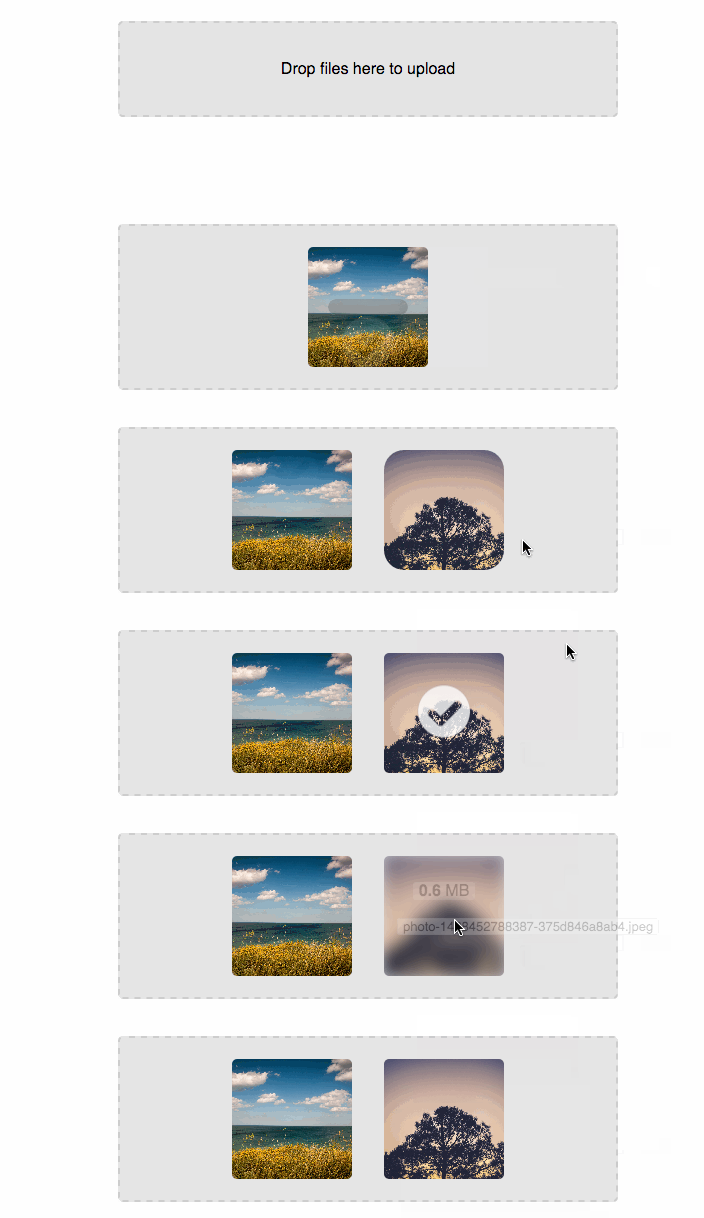
# react-dropzone-component **Repository Path**: mirrors_fis-components/react-dropzone-component ## Basic Information - **Project Name**: react-dropzone-component - **Description**: Fork from https://github.com/felixrieseberg/React-Dropzone.git - **Primary Language**: Unknown - **License**: Not specified - **Default Branch**: master - **Homepage**: None - **GVP Project**: No ## Statistics - **Stars**: 0 - **Forks**: 0 - **Created**: 2020-08-08 - **Last Updated**: 2026-05-02 ## Categories & Tags **Categories**: Uncategorized **Tags**: None ## README ## Dropzone.js Component for React [![Build Status](https://travis-ci.org/felixrieseberg/React-Dropzone-Component.svg?branch=master)](https://travis-ci.org/felixrieseberg/React-Dropzone-Component) [![Dependency Status](https://david-dm.org/felixrieseberg/react-dropzone-component.svg)](https://david-dm.org/felixrieseberg/react-dropzone-component) [![npm version](https://badge.fury.io/js/react-dropzone-component.svg)](https://badge.fury.io/js/react-dropzone-component) ![Downloads](https://img.shields.io/npm/dm/react-dropzone-component.svg) A dropzone component for ReactJS, allowing users to "drag and drop" files into an upload area. The component uses the battle-tested [Dropzone.js](http://www.dropzonejs.com/) to provide a cross-browser-compatible upload component. You [can see a demo of the uploader with minimal configuration here](http://reactdropzone.azurewebsites.net/example).


Screen GIF
* [Simple Usage Example](#usage) * [Accessing the Dropzone.js object](#accessing-the-dropzone-object) * [Usage without automatic posting](#usage-without-automatic-posting) * [Custom Preview Template](#custom-preview-template) * [Custom Post Parameters](#custom-post-parameters) * [Updating the Component's Properties](#updating-the-components-properties) * [Callbacks](#callbacks) * [Server Example](#server-example) ## Usage The component is initialized with a configuration object. Optional are a list of event handlers and a configuration object for dropzone.js. If you are using one of the many module solutions, you can simply install and require this component like shown below. The package's main entry point is `lib/dropzone.js`, which gives you all the dropzone components. If you're rolling with ES6/ES2015, feel free to use `src/dropzone.js`. If you don't want any trouble at all, just add `dist/dropzone.min.js` as a script to your app and use ``. Please ensure that you also include two required CSS files: `styles/filepicker.css` and `node_modules/dropzone/dist/min/dropzone.min.css`. There are currently a bunch of good ways to combine and process CSS in React, so I'll leave it to you to choose whatever method is best for you - the component does not automatically load CSS. ``` npm install react-dropzone-component ``` ```js var React = require('react'); var DropzoneComponent = require('react-dropzone-component'); React.render( , document.getElementById('content') ); ``` The configuration allows you to disable the display of CSS file type icons and to set the URL to which uploads should be posted. ```js var componentConfig = { iconFiletypes: ['.jpg', '.png', '.gif'], showFiletypeIcon: true, postUrl: '/uploadHandler' }; ``` ##### Accessing the Dropzone Object There are a bunch of operations that might require accessing the dropzone object, especially when wanting to call [dropzone methods](http://www.dropzonejs.com/#dropzone-methods). To get said object, use the `init` event, whose callback will receive a reference to the dropzone object as a parameter. ```JS var myDropzone; function initCallback (dropzone) { myDropzone = dropzone; } function removeFile () { if (myDropzone) { myDropzone.removeFile(); } } ``` ##### Usage Without Automatic Posting If you want to use this component without posting automatically to a URL but instead do the posting yourself, then you can just leave the `postUrl` option empty and handle the displaying of progress by yourself using the provided event handlers. In this case, Dropzone.js requires that the Dropzone Component is creates as a `
` with the `action` attribute set. To use this feature, use the component like so: ``` var componentConfig = { iconFiletypes: ['.jpg', '.png', '.gif'], showFiletypeIcon: true // Notice how there's no postUrl set here }; React.render( , document.getElementById('content') ); ``` ##### Custom Preview Template The djsconfig property is compatible with all of the options in the official [DropzoneJS documentation](http://www.dropzonejs.com/). Updating the preview template can be done as follows: ```js var ReactDOMServer = require('react-dom/server'); var djsConfig = { previewTemplate: ReactDOMServer.renderToStaticMarkup(
) } ``` ##### Custom Post Parameters To add custom parameters to your request, add a `params` property to your Dropzone.js configuration object. You can check out the included example by running `grunt params`. ``` var djsConfig = { addRemoveLinks: true, params: { myParameter: "I'm a parameter!" } }; var componentConfig = { postUrl: '/uploadHandler' }; React.render(, document.getElementById('content')); ``` ### Callbacks Callbacks can be provided in an object literal. ```js var eventHandlers = { // This one receives the dropzone object as the first parameter // and can be used to additional work with the dropzone.js // object init: null, // All of these receive the event as first parameter: drop: callbackArray, dragstart: null, dragend: null, dragenter: null, dragover: null, dragleave: null, // All of these receive the file as first parameter: addedfile: simpleCallBack, removedfile: null, thumbnail: null, error: null, processing: null, uploadprogress: null, sending: null, success: null, complete: null, canceled: null, maxfilesreached: null, maxfilesexceeded: null, // All of these receive a list of files as first parameter // and are only called if the uploadMultiple option // in djsConfig is true: processingmultiple: null, sendingmultiple: null, successmultiple: null, completemultiple: null, canceledmultiple: null, // Special Events totaluploadprogress: null, reset: null, queuecomplete: null } ``` To provide a single callback, simply override one of these events with your function reference. If you want to provide multiple callbacks, simply provide an array with your function references. ```js var callbackArray = [ function () { console.log('Look Ma, I\'m a callback in an array!'); }, function () { console.log('Wooooow!'); } ]; var simpleCallBack = function () { console.log('I\'m a simple callback'); }; ``` #### Updating the Component's Properties This React Component is a wrapper around Dropzone.js - meaning that Dropzone.js is not aware of the React component life cycle. When you update the component's properties, we will use a copy of jQuery's `extend` method ([see documentation](https://api.jquery.com/jquery.extend/)) to merge new options into the Dropzone's properties object. If you want to fundamentally change things about your dropzone, we recommend that you either modify the Dropzone object directly or destroy and recreate the component. ## Server Example This component comes with a small server example. To try it out, simply run `npm install` and then `grunt` from the component's folder. Visit `http://localhost:8000/example/` to see the uploads working. To check out the (super small) source code for this simple upload-accepting server, check out `src-server/` and `server.js`. **The component works with any server infrastructure, though!** ## License MIT. For details, please consult `README.md`.