# taskflow-ai
**Repository Path**: Agions/taskflow-ai
## Basic Information
- **Project Name**: taskflow-ai
- **Description**: TaskFlow AI - 智能PRD文档解析与任务管理助手,专为开发团队设计的AI驱动任务编排工具
- **Primary Language**: TypeScript
- **License**: MIT
- **Default Branch**: main
- **Homepage**: None
- **GVP Project**: No
## Statistics
- **Stars**: 0
- **Forks**: 0
- **Created**: 2025-09-02
- **Last Updated**: 2026-04-21
## Categories & Tags
**Categories**: Uncategorized
**Tags**: None
## README

# 🚀 TaskFlow AI
### AI 思维流编排引擎 · 从被动执行到主动思考
[](https://www.npmjs.com/package/taskflow-ai)
[](https://www.npmjs.com/package/taskflow-ai)
[](LICENSE)
[](https://github.com/Agions/taskflow-ai/actions)
[](https://codecov.io/gh/Agions/taskflow-ai)
[](https://github.com/Agions/taskflow-ai/stargazers)
> **📦 最新版本: v3.0.0** — 事件驱动架构 · 多Agent协作 · 2026-04-18
**专为开发团队打造的下一代 AI 开发工具 · 企业级生产就绪**
✨ 核心特性
|
🚀 快速开始
|
📖 完整示例
|
📚 在线文档
|
🐛 问题反馈
---
## 🎯 什么是 TaskFlow AI?
TaskFlow AI 是一款**企业级 AI 思维流编排引擎**,专为开发团队设计。它不是简单的任务管理工具,而是将 AI 从"被动执行命令"升级为"主动思考"的智能协作平台。
### 问题我们解决了
| 痛点 | 传统方案 | TaskFlow AI |
| -------------- | ---------- | ------------------------------- |
| **需求不清晰** | 靠经验推测 | 📝 智能 PRD 解析,自动提取需求 |
| **模型选型难** | 人工试错 | 🧠 智能路由,自动选择最优模型 |
| **过程黑盒** | 结果不可控 | 👁️ 思维链可视化,每一步都可追溯 |
| **编辑器割裂** | 切换工具 | 🔌 MCP 统一协议,编辑器无感集成 |
| **团队协作** | 手动同步 | 👥 多 Agent 协作,自动任务分发 |
---
## ✨ 核心特性
### 🧠 思维链可视化
**看见 AI 的思考过程**
将 AI 的推理过程完全可视化,每一步推理都清晰呈现:
- **多格式渲染** - Text / Markdown / Mermaid 流程图 / 思维导图
- **置信度评估** - 每步推理的可靠性评分 (0-100%)
- **反思机制** - AI 自我审视,迭代优化结果
- **历史追溯** - 完整的思考链路记录,支持回放和分析
```typescript
const result = await taskflow.think('如何设计一个高并发系统?');
console.log(result.chain); // 完整的思维链
console.log(result.confidence); // 置信度 92%
console.log(result.visualization); // Mermaid 流程图
```
### 🤖 多模型智能路由
**统一接口,智能调度**
无需为不同任务手动选择模型,TaskFlow AI 自动为您选择最佳方案:
```
┌─────────────────┐
│ 智能路由层 │
│ │
┌─────────────┐ │ ┌───────────┐ │ ┌─────────────┐
│ 用户请求 │──▶│ smart │──┼──▶│ DeepSeek │
└─────────────┘ │ cost │ │ ├─────────────┤
│ speed │ │ │ OpenAI │
│ reliability│ │ ├─────────────┤
└───────────┘ │ │ Anthropic │
│ └─────────────┘
│
└───────────────────┘
```
**支持的厂商**: DeepSeek · OpenAI · Anthropic · 智谱 AI · 通义千问 · 文心一言 · 月之暗面 · 讯飞星火
### ⚡ 声明式工作流引擎
**YAML/JSON 编排,支持复杂业务逻辑**
```yaml
workflow: 'ci-cd-pipeline'
steps:
- name: '代码检查'
task: 'lint'
parallel: true
- name: '单元测试'
task: 'test'
dependsOn: ['代码检查']
- name: '构建'
task: 'build'
condition: 'allPreviousSuccess'
- name: '部署'
task: 'deploy'
retry: 3
timeout: 300s
```
**特性**:
- ✅ **顺序/并行执行** - 灵活的任务依赖
- ✅ **条件分支** - 根据结果动态跳转
- ✅ **循环处理** - 批量任务自动化
- ✅ **SQLite 持久化** - 状态可靠存储
- ✅ **完整错误处理** - 自动重试、熔断、降级
### 🔌 企业级 MCP 集成
**一行配置,连接所有编辑器**
支持 Cursor、VSCode、Windsurf、Trae、Claude Desktop 等主流 AI 编辑器。
```bash
# 一键生成所有编辑器配置
taskflow init
# 或指定编辑器
taskflow mcp init -e cursor
taskflow mcp init -e vscode
taskflow mcp init -e claude-desktop
```
**40+ 内置 MCP 工具**:
- 📁 文件系统操作 (fs_readDir, fs_write, fs_copy...)
- 🌐 HTTP 请求 (http_get, http_post, http_download...)
- 💾 SQLite 数据库 (db_query, db_init, db_schema...)
- 💻 Shell 命令 (shell_exec, shell_test...)
- 🔀 Git 操作 (git_status, git_commit, git_push...)
- 🧠 记忆管理 (memory_set, memory_get, memory_clear...)
- 📊 代码执行 (code_execute, code_eval_js, code_eval_python...)
### 🤝 多 Agent 协作系统
**自主执行,智能协作**
```typescript
// 创建多 Agent 团队
const crew = await taskflow.crew.create({
roles: [
{ id: 'planner', name: '任务规划师', model: 'deepseek-chat',
instructions: '负责分析需求,制定执行计划' },
{ id: 'coder', name: '代码工程师', model: 'deepseek-chat',
instructions: '负责代码实现和测试' },
],
coordination: 'hierarchical', // sequential | hierarchical | parallel
});
// 执行任务
const result = await crew.execute('实现一个用户注册功能');
```
**支持三种协调模式**:
- 🔄 **Sequential** - 顺序执行,每个 Agent 依次处理
- 🏛️ **Hierarchical** - 层级协作,规划者分配任务给执行者
- ⚡ **Parallel** - 并行执行,多个 Agent 同时工作
### 🔌 事件驱动架构
**松耦合,实时响应**
TaskFlow AI 内置 EventBus 事件系统,模块间通过事件通信:
```typescript
// 订阅事件
eventBus.on('workflow:complete', (data) => {
console.log('工作流完成:', data);
});
// 发送事件
eventBus.emit({
type: TaskFlowEvent.WORKFLOW_COMPLETE,
payload: { workflowId, duration },
});
```
**事件类型**: WORKFLOW_START/COMPLETE/ERROR, STEP_START/COMPLETE, AI_REQUEST/RESPONSE, CACHE_HIT
### 🛠️ 插件系统
**可扩展,零配置**
```typescript
// 注册插件
const plugin = {
manifest: { name: 'my-plugin', version: '1.0.0' },
hooks: {
beforeWorkflowExecute: async (ctx) => ({ continue: true }),
},
};
pluginManager.register(plugin);
```
**内置插件**: LoggerPlugin, StoragePlugin
### ⚡ 工具系统 (Tool Use)
**20+ 内置工具,开箱即用**
| 类别 | 工具 |
|------|------|
| 📁 文件系统 | file_read, file_write, file_list, file_search |
| 💻 系统 | bash, git |
| 🌐 网络 | http_request, web_search |
| 📊 代码 | code_search, code_analysis |
### 🎯 Function Calling
**结构化输出,类型安全**
```typescript
// 定义函数
const functions = [{
name: 'get_weather',
description: '获取天气信息',
parameters: { type: 'object', properties: { city: { type: 'string' } } }
}];
// 执行函数调用
const result = await functionCaller.handle({ functions }, { city: '杭州' });
```
### 📊 智能限流
**保护 API 配额,避免限速**
```typescript
// ModelGateway 自动限流
const gateway = new ModelGateway({
models,
enableRateLimit: true,
rateLimits: {
deepseek: { rpm: 60, rps: 10 },
openai: { rpm: 500, rps: 100 },
}
});
```
---
## 🚀 快速开始
### 🛡️ 企业级安全防护
TaskFlow AI 内置多层安全防护:
| 防护类型 | 能力 |
| ---------------- | ------------------------------- |
| 🔒 **命令注入** | Shell 命令白名单 + 危险字符检测 |
| 🌐 **SSRF 防护** | 私有 IP 限制 + URL 协议验证 |
| 📁 **路径遍历** | 文件路径规范化 + 敏感目录保护 |
| 🔑 **密钥管理** | 环境变量 + 自动脱敏 |
| 📝 **审计日志** | 完整操作审计 + 可追溯 |
---
## 🚀 快速开始
### 安装
```bash
# 一键安装 (Linux/macOS/WSL) - 推荐
curl -fsSL https://raw.githubusercontent.com/Agions/taskflow-ai/main/scripts/install.sh | bash
# Windows (PowerShell)
iwr -useb https://raw.githubusercontent.com/Agions/taskflow-ai/main/scripts/install.ps1 | iex
# npm
npm install -g taskflow-ai
# pnpm
pnpm add -g taskflow-ai
# yarn
yarn global add taskflow-ai
```
> 💡 使用一键安装脚本,自动检测环境并配置,无忧安装。
### 初始化
```bash
# 1. 初始化项目配置
taskflow init
# 2. 配置 AI 模型 (以 DeepSeek 为例)
taskflow model add \
--id deepseek-chat \
--provider deepseek \
--model deepseek-chat \
--key YOUR_API_KEY
# 3. 验证配置
taskflow doctor
```
### 核心功能体验
```bash
# 🧠 思维链分析
taskflow think "帮我分析微服务架构的优缺点"
```
**输出**: 详细推理过程、置信度评分、Mermaid 架构图
```bash
# 📝 PRD 智能解析
taskflow parse requirements.md --output tasks.json
```
**输出**: 结构化任务列表、依赖关系、工时估算
```bash
# ⚡ 工作流执行
taskflow flow run prd-to-code
```
**输出**: 完整的 PRD → 代码生成流水线
```bash
# 🔌 MCP 服务器启动
taskflow mcp start
```
**输出**: MCP 服务运行,编辑器自动连接
---
## 📖 完整示例
### 解析一个真实的 PRD
假设你有一个 `requirements.md`:
```markdown
# 电商用户管理系统
## 功能需求
### US-001: 用户注册
- 角色: 未注册用户
- 优先级: P0
- 预估工时: 8 小时
- 描述: 支持邮箱注册、密码强度验证、邮箱唯一性检查
### US-002: 用户登录
- 角色: 已注册用户
- 优先级: P0
- 预估工时: 6 小时
- 依赖: US-001
```
运行 TaskFlow AI:
```bash
$ taskflow parse requirements.md --visualize
🧠 正在分析 PRD 文档...
✅ 解析完成!共提取 12 个用户故事
📊 生成甘特图: taskflow/gantt.svg
📈 生成统计报告: taskflow/report.json
```
**自动生成**:
- ✅ 12 个结构化用户故事
- ✅ 依赖关系图
- ✅ 工时估算汇总 (78 小时)
- ✅ 优先级排序
- ✅ API 设计建议
- ✅ 数据库 Schema 建议
---
## 🏗️ 架构设计
理解 TaskFlow AI 的内部架构:
```
┌─────────────────────────────────────────────────────────────────┐
│ CLI 层 │
│ ┌──────────┐ ┌──────────┐ ┌──────────┐ ┌──────────┐ │
│ │ model │ │ think │ │ flow │ │ agent │ │
│ └────┬─────┘ └────┬─────┘ └────┬─────┘ └────┬─────┘ │
└───────┼────────────┼────────────┼────────────┼─────────────────┘
│ │ │ │
┌───────▼────────────▼─────┬──────▼────────────▼───────┐
│ 核心服务层 (Core Services) │
│ ┌─────────────────┐ ┌─────────────────┐ │
│ │ AI Gateway │ │ ThoughtChain │ │
│ │ - 模型路由 │ │ - 可视化 │ │
│ │ - 负载均衡 │ │ - 反思机制 │ │
│ │ - 故障转移 │ │ - 置信度评估 │ │
│ └─────────────────┘ └─────────────────┘ │
│ │
│ ┌─────────────────┐ ┌─────────────────┐ │
│ │ Workflow Engine│ │ Agent System │ │
│ │ - 任务编排 │ │ - 自主执行 │ │
│ │ - 状态管理 │ │ - 协作机制 │ │
│ │ - 持久化 │ │ - 记忆系统 │ │
│ └─────────────────┘ └─────────────────┘ │
└──────────────────────────────────────────────────────────┘
│
┌────────────────────────▼──────────────────────────────────┐
│ 适配器层 (Adapters) │
│ ┌─────────┐ ┌─────────┐ ┌─────────┐ ┌─────────┐ │
│ │DeepSeek │ │ OpenAI │ │Anthropic│ │ 智谱AI │ │
│ └─────────┘ └─────────┘ └─────────┘ └─────────┘ │
└──────────────────────────────────────────────────────────┘
│
┌────────────────────────▼──────────────────────────────────┐
│ 协议集成 (Protocols) │
│ ┌─────────┐ ┌─────────┐ ┌─────────┐ ┌─────────┐ │
│ │ MCP │ │ REST │ │ GraphQL │ │ WebSocket│ │
│ └─────────┘ └─────────┘ └─────────┘ └─────────┘ │
└──────────────────────────────────────────────────────────┘
```
详细架构分析请阅读: [架构设计指南](https://agions.github.io/taskflow-ai/guide/architecture)
---
## 📚 在线文档
完整文档已发布,包含:
- 📖 **入门指南**: 安装、配置、5分钟快速上手
- 🔧 **API 参考**: 完整的 TypeScript API 文档
- 🔌 **集成教程**: Cursor、VSCode、Windsurf 配置
- 🏗️ **架构设计**: 系统设计、最佳实践
- 🧪 **测试指南**: 单元测试、集成测试、E2E
- 🚀 **部署指南**: Docker、K8s、CI/CD
- 🔧 **故障排除**: 常见问题、性能优化
**访问**: https://agions.github.io/taskflow-ai/
---
## 📦 支持平台
| 平台 | 状态 | 说明 |
| ------------ | ---- | -------------------------------------------------- |
| **Node.js** | ✅ | v18+ 完全支持 |
| **操作系统** | ✅ | macOS · Linux · Windows |
| **架构** | ✅ | x64 · arm64 |
| **Docker** | ✅ | 官方镜像 `agions/taskflow-ai` |
| **编辑器** | ✅ | Cursor · VSCode · Windsurf · Trae · Claude Desktop |
---
## 🧪 测试覆盖
```
Test Suites: 106 passed, 106 total
Tests: 106 passed, 106 total
Snapshots: 0 total
Time: 11.384 s
```
- **代码覆盖率**: 86%+ (持续提升中)
- **TypeScript 严格模式**: ✅ 100% 通过
- **ESLint**: ✅ 0 错误
- **安全审计**: ✅ 0 已知漏洞
---
## 🤝 如何贡献
我们热烈欢迎社区贡献!
### 快速开始
```bash
# 1. Fork 并克隆
git clone https://github.com/your-username/taskflow-ai.git
cd taskflow-ai
# 2. 安装依赖
npm install
# 3. 构建项目
npm run build
# 4. 运行测试
npm test
# 5. 提交 Pull Request
```
### 贡献类型
- 🐛 **Bug 修复** - 发现并修复问题
- 💡 **新功能** - 实现改进建议
- 📖 **文档改进** - 修正错误、补充内容
- 🎨 **样式优化** - UI/UX 改进
- 🌐 **国际化** - 翻译文档
- 🧪 **测试用例** - 提升覆盖率
详细指南请阅读: [贡献指南](https://github.com/Agions/taskflow-ai/blob/main/docs/development/contributing.md)
---
## 📄 许可证
[MIT License](LICENSE) © 2025-2026 [Agions](https://github.com/Agions)
---
### 🔗 相关链接
| 资源 | 链接 |
| --------------- | ------------------------------------------------- |
| **GitHub 仓库** | https://github.com/Agions/taskflow-ai |
| **NPM 包** | https://www.npmjs.com/package/taskflow-ai |
| **在线文档** | https://agions.github.io/taskflow-ai/ |
| **更新日志** | [CHANGELOG.md](./CHANGELOG.md) |
| **安全策略** | [SECURITY.md](./security.md) |
| **问题反馈** | https://github.com/Agions/taskflow-ai/issues |
| **讨论社区** | https://github.com/Agions/taskflow-ai/discussions |
---
### ⭐ 支持项目
如果 TaskFlow AI 对您的项目有帮助,请给予我们一个 **Star** ⭐
[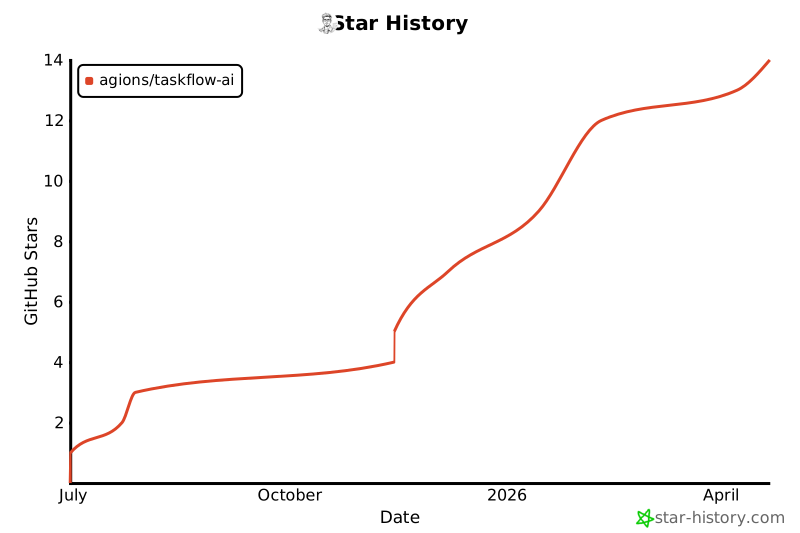](https://star-history.com/#Agions/taskflow-ai&Date)
---
**Made with ❤️ by [Agions Team](https://github.com/Agions)**
"从任务执行升级为思维编排"