# Aix-DB
**Repository Path**: 5120/Aix-DB
## Basic Information
- **Project Name**: Aix-DB
- **Description**: Aix-DB 基于 LangChain/LangGraph 框架,结合 MCP Skills 多智能体协作架构,实现自然语言到数据洞察的端到端转换。
- **Primary Language**: Unknown
- **License**: Not specified
- **Default Branch**: master
- **Homepage**: None
- **GVP Project**: No
## Statistics
- **Stars**: 0
- **Forks**: 5
- **Created**: 2026-02-10
- **Last Updated**: 2026-02-10
## Categories & Tags
**Categories**: Uncategorized
**Tags**: None
## README

Aix-DB - LLM Data Assistant
An intelligent data analytics system powered by Large Language Models and RAG technology, enabling conversational data analysis (ChatBI) for rapid data extraction and visualization




简体中文 | English
---
Aix-DB is built on the **LangChain/LangGraph** framework, combined with **MCP Skills** multi-agent collaboration architecture, enabling end-to-end transformation from natural language to data insights.
**Core Capabilities**: General Q&A · Data Q&A (Text2SQL) · Spreadsheet Q&A · Deep Research · Data Visualization · MCP Multi-Agent
**Product Features**: 📦 Ready to Use · 🔒 Secure & Controllable · 🔌 Easy Integration · 🎯 Increasingly Accurate
---
## Demo Video
| 🎯 Skill Mode |
💬 Standard Mode |
|
|
|
---
## System Architecture

**Layered Architecture Design:**
- **Frontend Layer**: Modern web interface built with Vue 3 + TypeScript, integrated with ECharts and AntV visualization components
- **API Gateway Layer**: High-performance async API service based on Sanic, providing RESTful interfaces and JWT authentication
- **Intelligent Service Layer**: LLM services, Text2SQL Agent, RAG retrieval engine, MCP multi-agent collaboration
- **Data Storage Layer**: Support for multiple database types including relational databases, vector databases, graph databases, and file storage
---
## Supported Data Sources












| Step | Module | Description |
|:---:|--------|-------------|
| 1 | **User Input** | User asks data query questions in natural language |
| 2 | **LLM Intent Understanding** | LLM parses question intent, extracts key entities and query conditions |
| 3 | **RAG Knowledge Retrieval** | Embedding + BM25 hybrid retrieval, combined with Neo4j graph to obtain relevant table structures and business knowledge |
| 4 | **SQL Generation** | Text2SQL engine generates SQL statements with syntax validation and optimization |
| 5 | **Database Execution** | Execute SQL on target data source, supporting 8+ database types |
| 6 | **Visualization** | Automatically generate ECharts/AntV charts to present analysis results |
---
## Quick Start
### Deploy with Docker (Recommended)
```bash
docker run -d \
--name aix-db \
--restart unless-stopped \
-e TZ=Asia/Shanghai \
-e SERVER_HOST=0.0.0.0 \
-e SERVER_PORT=8088 \
-e SERVER_WORKERS=2 \
-p 18080:80 \
-p 18088:8088 \
-p 15432:5432 \
-p 9000:9000 \
-p 9001:9001 \
-v ./volume/pg_data:/var/lib/postgresql/data \
-v ./volume/minio/data:/data \
-v ./volume/logs/supervisor:/var/log/supervisor \
-v ./volume/logs/nginx:/var/log/nginx \
-v ./volume/logs/aix-db:/var/log/aix-db \
-v ./volume/logs/minio:/var/log/minio \
-v ./volume/logs/postgresql:/var/log/postgresql \
--add-host host.docker.internal:host-gateway \
crpi-7xkxsdc0iki61l0q.cn-hangzhou.personal.cr.aliyuncs.com/apconw/aix-db:1.2.2
```
### Deploy with Docker Compose
```bash
git clone https://github.com/apconw/Aix-DB.git
cd Aix-DB/docker
docker-compose up -d
```
### Access the System
**Web Management Interface**
- URL: http://localhost:18080
- Username: `admin`
- Password: `123456`
**PostgreSQL Database**
- Connection: `localhost:15432`
- Database: `aix_db`
- Username: `aix_db`
- Password: `1`
### Local Development
**① Clone the Repository**
```bash
git clone https://github.com/apconw/Aix-DB.git
cd Aix-DB
```
**② Start Middleware Dependencies** (PostgreSQL, MinIO, etc.)
```bash
cd docker
docker-compose up -d
```
**③ Configure Environment Variables**
Edit `.env.dev` in the project root to set database connection, MinIO address, etc. (default config works out of the box)
**④ Install Python Dependencies** (requires Python 3.11)
```bash
# Option 1: pip
pip install -r requirements.txt
# Option 2: uv (recommended, faster)
uv venv --python 3.11
source .venv/bin/activate
uv sync
```
**⑤ Start Backend Service**
```bash
python serv.py
```
**⑥ Start Frontend Dev Server** (in another terminal)
```bash
cd web
npm install
npm run dev
```
---
## Tech Stack
**Backend**: Sanic · SQLAlchemy · LangChain/LangGraph · Neo4j · FAISS/Chroma · MinIO
**Frontend**: Vue 3 · TypeScript · Vite 5 · Naive UI · ECharts · AntV
**AI Models**: OpenAI · Anthropic · DeepSeek · Qwen · Ollama
---
## Documentation
- [Configuration Guide](./docs/docs/index.md)
- [API Documentation](http://localhost:8088/docs) (available after startup)
---
## Contributing
We welcome Issues and Pull Requests!
1. Fork this repository
2. Create a feature branch (`git checkout -b feature/AmazingFeature`)
3. Commit your changes (`git commit -m 'Add some AmazingFeature'`)
4. Push to the branch (`git push origin feature/AmazingFeature`)
5. Open a Pull Request
---
## Contact Us
If you have any questions, feel free to reach out:
- [GitHub Issues](https://github.com/apconw/Aix-DB/issues)
---
## Star History
[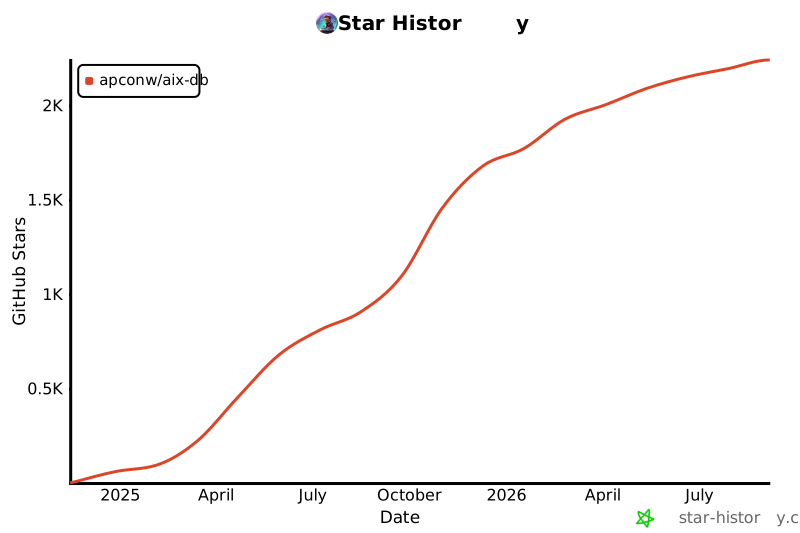](https://star-history.com/#apconw/Aix-DB&Date)
---
## License
This project is licensed under the [Apache License 2.0](./LICENSE).